Deprecated: Creation of dynamic property Pusher\Log\Logger::$file is deprecated in /html/wordpress/wp-content/plugins/wppusher/Pusher/Log/Logger.php on line 18

Deprecated: Creation of dynamic property Pusher\Log\Logger::$file is deprecated in /html/wordpress/wp-content/plugins/wppusher/Pusher/Log/Logger.php on line 18

Deprecated: Creation of dynamic property Pusher\Dashboard::$pusher is deprecated in /html/wordpress/wp-content/plugins/wppusher/Pusher/Dashboard.php on line 68

Deprecated: Creation of dynamic property Pusher\Log\Logger::$file is deprecated in /html/wordpress/wp-content/plugins/wppusher/Pusher/Log/Logger.php on line 18

Deprecated: Creation of dynamic property Pusher\Log\Logger::$file is deprecated in /html/wordpress/wp-content/plugins/wppusher/Pusher/Log/Logger.php on line 18
HCM Archives - j&s-soft

Category: HCM

  • From SAP S/4 to Wallet

    From SAP S/4 to Wallet

    Delivering sensitive documents securely and efficiently is a growing challenge in today’s digital workplace, especially when it comes to blue-collar workers (e.g., warehouse and logistics workers). These employees often lack access to traditional Employee Self-Service (ESS) portals, which require logging into systems or accessing company-issued devices. For many, retrieving important documents such as payslips, contracts, or tax forms can involve navigating shared terminals, HR desks, or even paper-based systems—adding complexity and reducing efficiency.
    To solve these issues, we integrated the enmeshed Wallet—a secure digital data exchange solution—with SAP S/4HANA via a CAP-based middleware running on SAP BTP. Instead of requiring users to log into yet another system, documents are automatically pushed to their enmeshed Wallet on their own smartphone devices the moment they are generated in SAP. Employees no longer need to manually request or retrieve documents—our automated system delivers them securely in the background, providing a seamless experience.


    Beyond document delivery, this setup enables bidirectional data exchange. Employees can update personal information, such as bank details or addresses, directly in their wallet, and these changes flow back into SAP S/4HANA. This automated, event-driven communication channel improves security, reduces administrative overhead, and enhances the overall user experience across multiple business functions.

    Architecture Overview

    At the core of our solution is an event-driven integration between SAP S/4HANA and the enmeshed Wallet. Whenever a relevant business event occurs in SAP—such as payroll processing, contract issuance, or billing—the system triggers an event that initiates a secure document transfer to the user’s wallet.

    SAP-enmeshed-Anbindung
    Figure 1: Solution Architecture at a Glance

    Key Components

    1. enmeshed Platform – Provides secure identity management, encrypted communication, and the enmeshed Wallet for users.
    2. CAP Middleware on SAP BTP – Acts as the bridge between SAP S/4HANA and enmeshed, handling authentication, event processing, and data exchange. It includes a Fiori administration UI to onboard, manage, and monitor user connections.
    3. SAP S/4HANA Backend – Generates documents, manages business logic, and triggers event notifications.
    Verbinden via QR-Code
    Figure 2: The Fiori UI for Administrative Tasks

    How It Works

    1. Business Event Trigger: The process begins in SAP S/4HANA. For example, when payroll is processed, a payslip is generated for an employee. This triggers an event in SAP’s Business Object Repository (BOR) framework, which we extended to fire event notifications when key business transactions occur.
    2. Event Dispatch via SAP Event Mesh: The event is picked up by SAP Event Mesh, ensuring scalable, real-time event propagation.
    3. Middleware Processing & Secure Document Fetching: The CAP-based middleware listens for these events. Upon receiving a trigger, it retrieves the relevant document (e.g., a payslip) on behalf of the user using OData services from SAP S/4HANA.
    4. Secure Delivery to the enmeshed Wallet: The middleware encrypts and securely transmits the document to the employee’s enmeshed Wallet using the enmeshed API. The employee receives a notification and can immediately access their document.

    This fully automated flow eliminates manual steps and the need for self-service portals, providing employees with an effortless and secure experience. On the other hand, since enmeshed is a self-sovereign data wallet, it allows the user to update personal attributes (such as names, marital status, bank account information, etc.) that are shared with the company. These attribute updates trigger events from the enmeshed Connector, which are listened to by the SAP Event Mesh and processed by our CAP Event Dispatcher. Depending on the attribute update, the middleware then uses standard SAP S/4HANA APIs to update relevant records, such as the Business Partner or SAP HCM records.


    The technical implementation leverages SAP BTP due to its excellent integration capabilities with S/4 systems and its provision of a robust cloud infrastructure. However, this solution can be adapted to other cloud PaaS infrastructures as well. The SAP Event Mesh could be replaced with another event-driven service, and since we’ve chosen standard protocols like OData, AMQP, and Webhooks to interconnect enmeshed and SAP S/4, the middleware can be easily restructured to fit into a customer’s cloud infrastructure landscape.

    Technical Flow

    Let’s dive deeper into how the system orchestrates user onboarding and document delivery:

    Employee Onboarding & Identity Linking

    Before employees can receive documents, they need to be onboarded into the system. This happens in a frictionless way:

    • Employees scan a QR code in the enmeshed Wallet, which could be provided through an onboarding letter and additionally secured with a PIN for extra protection.
    • This links their wallet identity to their Business Partner ID in SAP S/4HANA.
    • The enmeshed Connector validates and registers the user, establishing a secure and encrypted relationship between the wallet and SAP.
    • From this point onward, any documents associated with the employee’s Business Partner ID will automatically be sent directly to their wallet without the need for manual requests.

    Event-Driven Document Processing

    Once onboarding is complete, the system operates autonomously:

    1. A Business Event Occurs in SAP S/4HANA – For example, a new payslip is generated at the end of the payroll run.
    2. SAP Event Mesh Detects the Event – The event is propagated without the need for direct integration between SAP S/4HANA and external systems.
    3. CAP Middleware Retrieves the Document – Acting as a bridge, the middleware fetches the document on behalf of the user via OData services.
    4. The Document is Securely Delivered to the Wallet – The middleware encrypts and transmits the document to the user’s enmeshed Wallet, ensuring compliance with data privacy regulations.
    5. Employee Receives a Notification – The document is immediately available, eliminating the need for manual retrieval.

    Furthermore, the advanced data model of enmeshed allows for dynamic and granular interactions between SAP and the user. Not only can employees proactively update their personal data, but the employer’s system can also actively request specific data points as needed. For example, if an employee’s tax information is outdated or a signature is required for an HR document, the system can send a structured request directly to the enmeshed Wallet. The user then reviews and approves the request, and the validated data is securely transmitted back to SAP S/4HANA. This two-way, event-driven communication leverages enmeshed’s variety of request types, ensuring data integrity and compliance while reducing friction in administrative processes.

    enmeshed Wallet
    Figure 4: enmeshed Wallet

    Other Use Cases

    While our initial focus was payroll, the same architecture supports a wide range of enterprise scenarios:

    • Human Resources: Employment contracts, performance reviews, training certificates, benefits information.
    • Logistics: Shipping notifications, delivery confirmations, customs documentation.
    • Energy: Consumption reports, smart meter readings, billing documents.
    • Finance: Invoices, payment confirmations, financial statements.
    • Manufacturing: Quality certificates, compliance documentation, production reports.

    Conclusion

    This integration streamlines document exchange, minimizes administrative effort, and strengthens security—empowering organizations to operate more efficiently in a digital-first world. While we implemented this solution on SAP BTP, the architecture is extendable to PaaS environments of other hyperscalers, making it adaptable for a variety of enterprise environments. Its versatility allows organizations to securely exchange documents across HR, finance, logistics, manufacturing, and energy management.

    Read the other two parts of this blog series to find out how the Wallet makes everyday work easier:

    Gehalts­abrechnungen via Wallet sicher übermitteln

    SAP-Stammdaten­verwaltung für externe Mitarbeiter via Wallet

    If you would like to implement such a solution in your company, please contact us: sales@js-soft.com

  • From SAP S/4 to Wallet

    From SAP S/4 to Wallet

    Delivering sensitive documents securely and efficiently is a growing challenge in today’s digital workplace, especially when it comes to blue-collar workers (e.g., warehouse and logistics workers). These employees often lack access to traditional Employee Self-Service (ESS) portals, which require logging into systems or accessing company-issued devices. For many, retrieving important documents such as payslips, contracts, or tax forms can involve navigating shared terminals, HR desks, or even paper-based systems – adding complexity and reducing efficiency.
    To solve these issues, we integrated the enmeshed Wallet – a secure digital data exchange solution – with SAP S/4HANA via a CAP-based middleware running on SAP BTP. Instead of requiring users to log into yet another system, documents are automatically pushed to their enmeshed Wallet on their own smartphone devices the moment they are generated in SAP. Employees no longer need to manually request or retrieve documents – our automated system delivers them securely in the background, providing a seamless experience.


    Beyond document delivery, this setup enables bidirectional data exchange. Employees can update personal information, such as bank details or addresses, directly in their wallet, and these changes flow back into SAP S/4HANA. This automated, event-driven communication channel improves security, reduces administrative overhead, and enhances the overall user experience across multiple business functions.

    Architecture Overview

    At the core of our solution is an event-driven integration between SAP S/4HANA and the enmeshed Wallet. Whenever a relevant business event occurs in SAP – such as payroll processing, contract issuance, or billing – the system triggers an event that initiates a secure document transfer to the user’s wallet.

    SAP-enmeshed-Anbindung
    Figure 1: Solution Architecture at a Glance

    Key Components

    1. enmeshed Platform – Provides secure identity management, encrypted communication, and the enmeshed Wallet for users.
    2. CAP Middleware on SAP BTP – Acts as the bridge between SAP S/4HANA and enmeshed, handling authentication, event processing, and data exchange. It includes a Fiori administration UI to onboard, manage, and monitor user connections.
    3. SAP S/4HANA Backend – Generates documents, manages business logic, and triggers event notifications.
    Verbinden via QR-Code
    Figure 2: The Fiori UI for Administrative Tasks

    How It Works

    1. Business Event Trigger: The process begins in SAP S/4HANA. For example, when payroll is processed, a payslip is generated for an employee. This triggers an event in SAP’s Business Object Repository (BOR) framework, which we extended to fire event notifications when key business transactions occur.
    2. Event Dispatch via SAP Event Mesh: The event is picked up by SAP Event Mesh, ensuring scalable, real-time event propagation.
    3. Middleware Processing & Secure Document Fetching: The CAP-based middleware listens for these events. Upon receiving a trigger, it retrieves the relevant document (e.g., a payslip) on behalf of the user using OData services from SAP S/4HANA.
    4. Secure Delivery to the enmeshed Wallet: The middleware encrypts and securely transmits the document to the employee’s enmeshed Wallet using the enmeshed API. The employee receives a notification and can immediately access their document.

    This fully automated flow eliminates manual steps and the need for self-service portals, providing employees with an effortless and secure experience. On the other hand, since enmeshed is a self-sovereign data wallet, it allows the user to update personal attributes (such as names, marital status, bank account information, etc.) that are shared with the company. These attribute updates trigger events from the enmeshed Connector, which are listened to by the SAP Event Mesh and processed by our CAP Event Dispatcher. Depending on the attribute update, the middleware then uses standard SAP S/4HANA APIs to update relevant records, such as the Business Partner or SAP HCM records.


    The technical implementation leverages SAP BTP due to its excellent integration capabilities with S/4 systems and its provision of a robust cloud infrastructure. However, this solution can be adapted to other cloud PaaS infrastructures as well. The SAP Event Mesh could be replaced with another event-driven service, and since we’ve chosen standard protocols like OData, AMQP, and Webhooks to interconnect enmeshed and SAP S/4, the middleware can be easily restructured to fit into a customer’s cloud infrastructure landscape.

    Technical Flow

    Let’s dive deeper into how the system orchestrates user onboarding and document delivery:

    Employee Onboarding & Identity Linking

    Before employees can receive documents, they need to be onboarded into the system. This happens in a frictionless way:

    • Employees scan a QR code in the enmeshed Wallet, which could be provided through an onboarding letter and additionally secured with a PIN for extra protection.
    • This links their wallet identity to their Business Partner ID in SAP S/4HANA.
    • The enmeshed Connector validates and registers the user, establishing a secure and encrypted relationship between the wallet and SAP.
    • From this point onward, any documents associated with the employee’s Business Partner ID will automatically be sent directly to their wallet without the need for manual requests.

    Event-Driven Document Processing

    Once onboarding is complete, the system operates autonomously:

    1. A Business Event Occurs in SAP S/4HANA – For example, a new payslip is generated at the end of the payroll run.
    2. SAP Event Mesh Detects the Event – The event is propagated without the need for direct integration between SAP S/4HANA and external systems.
    3. CAP Middleware Retrieves the Document – Acting as a bridge, the middleware fetches the document on behalf of the user via OData services.
    4. The Document is Securely Delivered to the Wallet – The middleware encrypts and transmits the document to the user’s enmeshed Wallet, ensuring compliance with data privacy regulations.
    5. Employee Receives a Notification – The document is immediately available, eliminating the need for manual retrieval.

    Furthermore, the advanced data model of enmeshed allows for dynamic and granular interactions between SAP and the user. Not only can employees proactively update their personal data, but the employer’s system can also actively request specific data points as needed. For example, if an employee’s tax information is outdated or a signature is required for an HR document, the system can send a structured request directly to the enmeshed Wallet. The user then reviews and approves the request, and the validated data is securely transmitted back to SAP S/4HANA. This two-way, event-driven communication leverages enmeshed’s variety of request types, ensuring data integrity and compliance while reducing friction in administrative processes.

    enmeshed Wallet
    Figure 4: enmeshed Wallet

    Other Use Cases

    While our initial focus was payroll, the same architecture supports a wide range of enterprise scenarios:

    • Human Resources: Employment contracts, performance reviews, training certificates, benefits information.
    • Logistics: Shipping notifications, delivery confirmations, customs documentation.
    • Energy: Consumption reports, smart meter readings, billing documents.
    • Finance: Invoices, payment confirmations, financial statements.
    • Manufacturing: Quality certificates, compliance documentation, production reports.

    Conclusion

    This integration streamlines document exchange, minimizes administrative effort, and strengthens security – empowering organizations to operate more efficiently in a digital-first world. While we implemented this solution on SAP BTP, the architecture is extendable to PaaS environments of other hyperscalers, making it adaptable for a variety of enterprise environments. Its versatility allows organizations to securely exchange documents across HR, finance, logistics, manufacturing, and energy management.

    Read the other two parts of this blog series to find out how the Wallet makes everyday work easier:

    Gehalts­abrechnungen via Wallet sicher übermitteln

    SAP-Stammdaten­verwaltung für externe Mitarbeiter via Wallet

    If you would like to implement such a solution in your company, please contact us: sales@js-soft.com

  • Successfully migrate to SAP HCM for S/4HANA (H4S4)

    Successfully migrate to SAP HCM for S/4HANA (H4S4)

    Time is running: Anyone who wants to continue using SAP HCM must act. With the upcoming end of maintenance for the current SAP ERP systems, there is no way around SAP HCM for S/4HANA. The transition can be much more than a technical project – it can become a strategic milestone for the future of your HR processes.

    1. Planning is everything

    Before the actual migration begins, foundations must be laid. A clear project plan, realistic timing, and a deep understanding of your HR processes are essential. Early considerations around data cleansing, customizing, and interfaces set the stage for a smooth process.

    2. Reality meets project plan

    n practice, it becomes clear: no one fully understands “the SAP system.” Especially in long-established systems with many modules, users, and interfaces, collaboration between IT, departments, and external partners is essential. The following points help:

    • nvolve end users and IT early on
    • Identify all interfaces (including seemingly “minor” ones, such as Excel uploads)
    • Name and connect contact persons
    • Manage expectations realistically: migration is additional work, not day-to-day business

    3. Use the sandbox, gain experience

    A frequently underestimated success factor: copy the production system into a sandbox and test there. This allows for identification of error sources, trial configurations, and team training. Investing here saves time and nerves during live operation.

    4. The SAP Readiness Check

    Every successful migration begins with the SAP Readiness Check. This tool provides an initial analysis of the current state and highlights which requirements must be met for SAP HCM for S/4HANA.
    A key component is the SAP S/4HANA Sizing, which helps identify large-volume tables and potential for optimization. Combined with the Simplification Item Check (SI-Check), unused functionalities can also be uncovered, often pointing to legacy data. Archiving offers a smart alternative to deletion: with archiving objects, legacy data can be removed in a targeted and structured manner – including complex dependencies, such as business partners and associated vendors/customers.

    5. The migration process

    mportant: Even though SAP HCM for S/4HANA is technically very similar to the “old” HCM, there are differences that must be taken into account. One example: the use of new tools and functions – such as the integration of the Business Partner – brings new requirements.
    A commonly underestimated aspect is handling custom developments (custom code). According to SAP, many companies only actively use 40–60% of their custom code. It’s quite easy to track which developments are actually used in the system. This information is essential for custom code scoping. To fully leverage savings potential, tracking should ideally begin a year before migration.

    6. Custom code and compatibility

    After scoping comes the actual analysis: which parts of the code are compatible with S/4HANA, which need to be adapted or replaced? Tools like the SAP Readiness Check, ABAP Test Cockpit (ATC), the Fiori Custom Code Migration App, or a central check system (locally or via SAP BTP) offer structured support. If necessary, the Business Partner Integration must be prepared (this includes defining roles and number ranges, performing initial synchronization, etc.). It’s important that all analyses follow the same standards – for greater transparency and traceability.
    Now the Business Functions are activated: For a complete SAP HCM for S/4HANA, functions such as H4S4_1 and – when using the new Business Partner model – /SHCM/EE_BP_1 must be activated.
    This concludes the migration.

    7. Post Migration

    Post-Migration: Once the system is migrated, the fine-tuning begins. Now it’s determined whether the new HCM system runs efficiently and is future-proof:

    • Follow-up Business Partner Integration: perform another initial synchronization and schedule ongoing synchronization.
    • Check interfaces: existing integrations, such as with time management or applicant management systems, must be tested.

    8. Our Migration Roadmap

    Complex projects require clarity. That’s why we at js-soft have developed a structured migration roadmap that presents all phases of the transition at a glance – from preparation to migration to post-project support. We tailor this roadmap to each customer individually. This provides orientation during the project and helps allocate and use resources effectively.


    Our roadmap follows the Lean Migration Principle:

    • More efficient, because only what is actually used is migrated
    • Faster, because we focus on the technical migration
    • Transparent, because every phase is clearly and individually documented

    Conclusion: Preparation pays off. Migrating to SAP HCM for S/4HANA is a demanding but rewarding project. With early planning, technical depth, clean custom code handling, and a clear focus on communication and configuration, you lay the foundation for a stable and modern HR system.


    How js-soft supports you: As experienced SAP experts, we at js-soft guide you through all project phases – from strategy to technical implementation. With proven know-how, tried-and-tested migration paths, and an eye for detail, we ensure your transition is a success.

    We offer a workshop that paves the way for a successful migration:
    In just a few days and with minimal resources, you will receive a clear action plan and concrete steps for a successful H4S4 transition.

    Are you facing migration or already in the middle of it? Let’s talk about how we can support you. Get in touch now.

  • Modern SAP Payroll Control Center

    Modern SAP Payroll Control Center

    With SAP SuccessFactors Employee Central Payroll (ECP), the management and monitoring of payroll processes are to be carried out directly from SuccessFactors. Technically, it is a web portal into which UI5 applications from an ERP backend are embedded. The actual payroll accounting and payroll runs continue to be performed in an ERP backend. A core component of ECP is the Payroll Control Centre (PCC), which has been offered as an add-on for ERP systems since 2014. The ECP portal primarily serves as a modern user interface providing access to the same underlying technology.

    If you already have an ERP backend and wish to use the modern PCC interface, you can do so without SuccessFactors. This blog details every step required to achieve this, based on SAP’s official setup guide.

    This blog article is the first part of a series on activating the PCC, focusing on the activation of the Configuration Workbench.

    Activating the Configuration Workbench

    The Configuration Workbench (CW) is used to set up validation rules and process types for the PCC. After activation, it can be accessed via transaction PYC_CONF_WB.

    Business Functions

    First, the required business functions must be activated using transaction SFW5. A list of the functions to be activated can be found here under point 2, or in the figure below. All functions are located in the ENTERPRISE_BUSINESS_FUNCTIONS folder. To activate them, tick the checkbox for ‘Planned Status’. Afterwards, you can save and activate the changes.

    Activating the business functions in SFW5

    SAPUI5 Applications

    Next, the UI5 applications that will later be embedded in SuccessFactors need to be activated. They are activated via transaction SICF. The list can be found here under point 3, or in the following table.
    To activate them, locate the service in the hierarchy, right-click on it, and select ‘Activate Service’.

    SAPUI5 ApplicationService Path
    Manage Teams/sap/bc/ui5_ui5/sap/hrpy_pcc_tm_1 (In der SAP-Doku falsch)
    My Teams/sap/bc/ui5_ui5/sap/hrpy_pcc_mc_1 (In der SAP-Doku falsch)
    My Processes/sap/bc/ui5_ui5/sap/hrpy_pcc_proc_3 (In der SAP-Doku falsch)
    My Alerts/sap/bc/ui5_ui5/sap/hrpy_pcc_errm_2
    Unassigned Alerts/sap/bc/ui5_ui5/sap/hrpy_pcc_em_t_2
    Manage Policies/sap/bc/ui5_ui5/sap/hrpy_pcc_conf_2
    Manage Processes/sap/bc/ui5_ui5/sap/hrpy_pcc_conf_1
    My Off-Cycles/sap/bc/ui5_ui5/sap/hrpy_pcc_oc_1
    Audit Trail/sap/bc/ui5_ui5/sap/hrpy_pcc_al_2

    OData Services

    The UI5 apps communicate with the backend via OData services to read and write data.
    If the UI5 apps run on a different backend than the payroll system, routing must be configured in the Reference IMG (transaction SPRO) under ‘Manage SAP System Aliases’. The exact hierarchy is shown in the screenshot below.
    In this test system, both the UI5 apps and the payroll run on the same backend, so this step is skipped and the existing system alias LOCAL is used.

    Customizing System Routing

    Now the OData services need to be activated.
    This is done via transaction /IWFND/MAINT_SERVICE. The list can be found here under point 4.
    The following services are required:

    OData ServiceTechnical Name
    Manage TeamsPYC_TEAM_MANAGER_SRV
    My TeamsPYC_TEAM_MAINT_SRV
    My ProcessesPYC_PROCESS_MANAGER_SRV
    My AlertsPYC_ALERT_MANAGER_SRV
    Unassigned AlertsPYC_TEAM_ALERTS_SRV
    Manage Policies
    Manage Processes
    PYC_CONF_SRV
    My Off-CyclesPYC_OFF_CYCLE_SRV
    Audit TrailPYC_CONT_003_SRV

    To activate the service, select it from the list and click on ‘ICF Node’ -> Activate in the bottom left corner of the window.
    In the bottom right corner of the window, the system alias must be added (here: LOCAL).
    If everything has worked correctly, the OData service can be tested using the SAP Gateway Client.

    Service Activation

    Declustering

    To store the validation data, declustering must be activated.
    In this process, data from encrypted cluster tables is copied into readable transparent tables. Payroll results are stored in cluster PCL2. This cluster consists of several tables, including the RT (Result Table) and WPBP (Work Center/Basic Pay) tables, which contain the data required for the PCC.
    We will configure the declustering so that the data is simultaneously stored in the transparent tables P2RX_RT and P2RX_WPBP when it is created in the cluster.

    To do this, you must once again access the Customising (SPRO).
    The path is: ‘SAP Customizing Implementation Guide’ -> Payroll -> ‘Payroll: Germany’ -> ‘Declustering Tools’ -> ‘Define Settings for Declustering Tools’.
    There, set ‘Switch Option’ to ‘Switched on with synchronous declustering’.
    ‘DB Connection’ remains empty.

    Define Settings for Declustering Tools

    In the same level of the Customising hierarchy, select ‘Select Tables with Payroll Results for Declustering’.
    We add the RT and WPBP tables.

    Select Tables with Payroll Results for Declustering

    In the next part of this blog series, we will activate the Manage Configuration app. You find it here.

    In the third and final part of our blog series on activating the Payroll Control Center (PCC), we walk you through the setup of the background processes. More here.

  • Facts about SAP HCM for SAP S/4HANA On-Premise (aka SAP H4S4)?

    The entire path to the cloud (cloud only) in HCM (SuccessFactors, Workday, …) is not an option for many SAP customers. That is why SAP presented SAP HCM for S/4HANA On-Premise, called H4S4, in fall 2022, a solution that is supported for pure on premises or hybrid solutions until at least 2040.
    Many of our customers are also switching to H4S4. The main reason for this is that payroll and time management cannot be mapped or cannot be mapped sufficiently in the corresponding cloud solution with SuccessFactors. After all, maintenance for the SAP ERP HCM Business Suite ends as early as 2027, and for HCM users via the Compatibility Pack on SAP S/4HANA, maintenance even ends at the end of 2025.
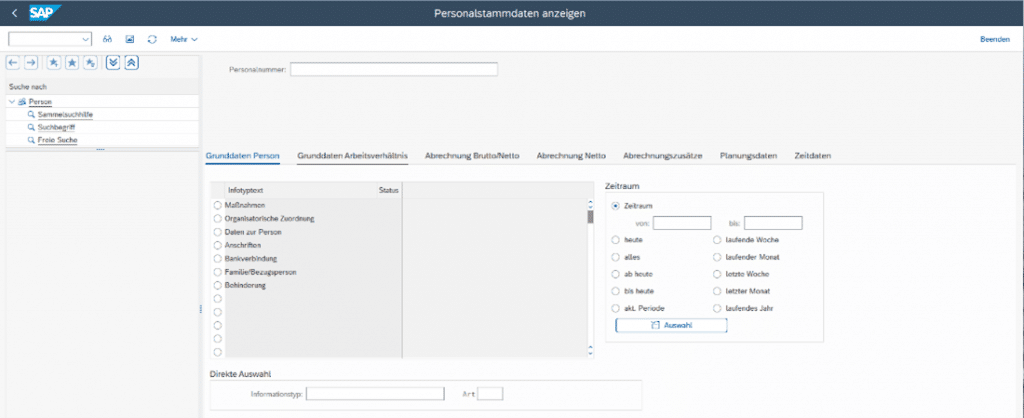
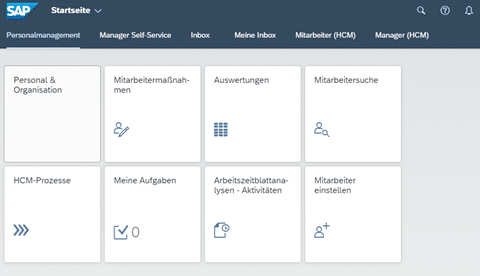
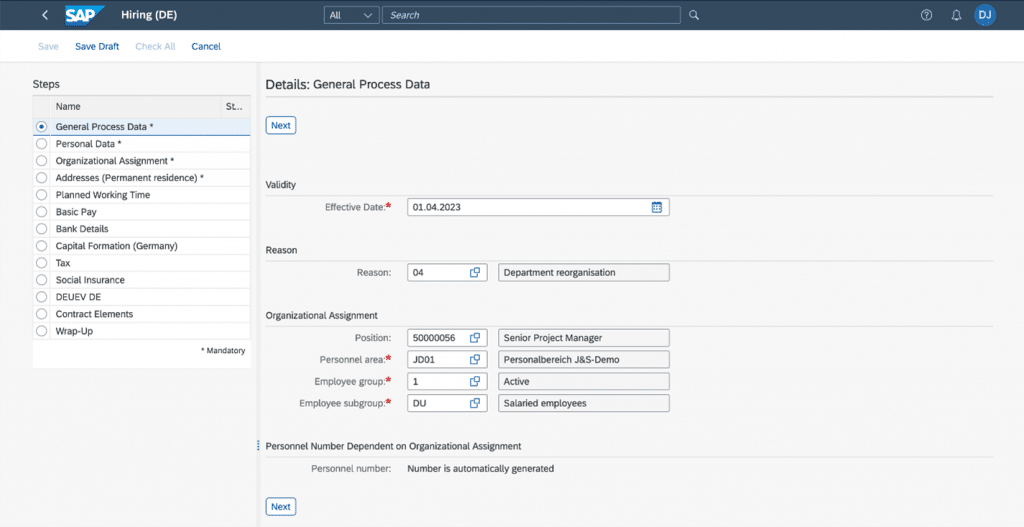
    Almost all functions of SAP ERP HCM are included in H4S4. The few exceptions can often be replaced by alternative functions. It is particularly important for our clientele that the payroll and time management components are fully available (see below).

    Screen 1: Working in a known environment: Calling up the transaction for HR master data

    Screen 2: With modernized interface technology via the Fiori Launchpad

    Screen 3: The new view with visual step sequence in the Steps window

    HCM for SAP S/4HANA On-Premise Edition Overview:

    Personal Management:

    Personal Management
    Personal Development
    Personal Cost Planning
    Organization Management
    Benefits
    Compensation
    Pension Scheme (DE/CH)
    MSS/ESS

    Payroll:

    Payroll
    SAP Travel Management

    Time Management:

    Time
    Shift Planning
    CATS

    Talent Management

    SAP Learning Solution
    SAP E-Recruiting

    Public Sector

    Public Sector
    Position Budgeting and Control
    Shift Planning for Public Sector
    HR Funds and Position Management

    Planen Sie einen Umstieg auf H4S4?

    Wenn Sie Fragen zum Thema haben, kontaktieren Sie uns gerne.