Deprecated: Creation of dynamic property Pusher\Log\Logger::$file is deprecated in /html/wordpress/wp-content/plugins/wppusher/Pusher/Log/Logger.php on line 18

Deprecated: Creation of dynamic property Pusher\Log\Logger::$file is deprecated in /html/wordpress/wp-content/plugins/wppusher/Pusher/Log/Logger.php on line 18

Deprecated: Creation of dynamic property Pusher\Dashboard::$pusher is deprecated in /html/wordpress/wp-content/plugins/wppusher/Pusher/Dashboard.php on line 68

Deprecated: Creation of dynamic property Pusher\Log\Logger::$file is deprecated in /html/wordpress/wp-content/plugins/wppusher/Pusher/Log/Logger.php on line 18

Deprecated: Creation of dynamic property Pusher\Log\Logger::$file is deprecated in /html/wordpress/wp-content/plugins/wppusher/Pusher/Log/Logger.php on line 18
Company Archives - j&s-soft

Category: Company

  • Successfully migrate to SAP HCM for S/4HANA (H4S4)

    Successfully migrate to SAP HCM for S/4HANA (H4S4)

    Time is running: Anyone who wants to continue using SAP HCM must act. With the upcoming end of maintenance for the current SAP ERP systems, there is no way around SAP HCM for S/4HANA. The transition can be much more than a technical project – it can become a strategic milestone for the future of your HR processes.

    1. Planning is everything

    Before the actual migration begins, foundations must be laid. A clear project plan, realistic timing, and a deep understanding of your HR processes are essential. Early considerations around data cleansing, customizing, and interfaces set the stage for a smooth process.

    2. Reality meets project plan

    n practice, it becomes clear: no one fully understands “the SAP system.” Especially in long-established systems with many modules, users, and interfaces, collaboration between IT, departments, and external partners is essential. The following points help:

    • nvolve end users and IT early on
    • Identify all interfaces (including seemingly “minor” ones, such as Excel uploads)
    • Name and connect contact persons
    • Manage expectations realistically: migration is additional work, not day-to-day business

    3. Use the sandbox, gain experience

    A frequently underestimated success factor: copy the production system into a sandbox and test there. This allows for identification of error sources, trial configurations, and team training. Investing here saves time and nerves during live operation.

    4. The SAP Readiness Check

    Every successful migration begins with the SAP Readiness Check. This tool provides an initial analysis of the current state and highlights which requirements must be met for SAP HCM for S/4HANA.
    A key component is the SAP S/4HANA Sizing, which helps identify large-volume tables and potential for optimization. Combined with the Simplification Item Check (SI-Check), unused functionalities can also be uncovered, often pointing to legacy data. Archiving offers a smart alternative to deletion: with archiving objects, legacy data can be removed in a targeted and structured manner – including complex dependencies, such as business partners and associated vendors/customers.

    5. The migration process

    mportant: Even though SAP HCM for S/4HANA is technically very similar to the “old” HCM, there are differences that must be taken into account. One example: the use of new tools and functions – such as the integration of the Business Partner – brings new requirements.
    A commonly underestimated aspect is handling custom developments (custom code). According to SAP, many companies only actively use 40–60% of their custom code. It’s quite easy to track which developments are actually used in the system. This information is essential for custom code scoping. To fully leverage savings potential, tracking should ideally begin a year before migration.

    6. Custom code and compatibility

    After scoping comes the actual analysis: which parts of the code are compatible with S/4HANA, which need to be adapted or replaced? Tools like the SAP Readiness Check, ABAP Test Cockpit (ATC), the Fiori Custom Code Migration App, or a central check system (locally or via SAP BTP) offer structured support. If necessary, the Business Partner Integration must be prepared (this includes defining roles and number ranges, performing initial synchronization, etc.). It’s important that all analyses follow the same standards – for greater transparency and traceability.
    Now the Business Functions are activated: For a complete SAP HCM for S/4HANA, functions such as H4S4_1 and – when using the new Business Partner model – /SHCM/EE_BP_1 must be activated.
    This concludes the migration.

    7. Post Migration

    Post-Migration: Once the system is migrated, the fine-tuning begins. Now it’s determined whether the new HCM system runs efficiently and is future-proof:

    • Follow-up Business Partner Integration: perform another initial synchronization and schedule ongoing synchronization.
    • Check interfaces: existing integrations, such as with time management or applicant management systems, must be tested.

    8. Our Migration Roadmap

    Complex projects require clarity. That’s why we at js-soft have developed a structured migration roadmap that presents all phases of the transition at a glance – from preparation to migration to post-project support. We tailor this roadmap to each customer individually. This provides orientation during the project and helps allocate and use resources effectively.


    Our roadmap follows the Lean Migration Principle:

    • More efficient, because only what is actually used is migrated
    • Faster, because we focus on the technical migration
    • Transparent, because every phase is clearly and individually documented

    Conclusion: Preparation pays off. Migrating to SAP HCM for S/4HANA is a demanding but rewarding project. With early planning, technical depth, clean custom code handling, and a clear focus on communication and configuration, you lay the foundation for a stable and modern HR system.


    How js-soft supports you: As experienced SAP experts, we at js-soft guide you through all project phases – from strategy to technical implementation. With proven know-how, tried-and-tested migration paths, and an eye for detail, we ensure your transition is a success.

    We offer a workshop that paves the way for a successful migration:
    In just a few days and with minimal resources, you will receive a clear action plan and concrete steps for a successful H4S4 transition.

    Are you facing migration or already in the middle of it? Let’s talk about how we can support you. Get in touch now.
  • Camunda SaaS-SAP BTP Integration using BPMN and DMN

    Camunda SaaS-SAP BTP Integration using BPMN and DMN

    TL;DR: Process-driven software is a thing. And always was. Now proven in a real world business scenario with the help of Camunda SaaS and SAP BTP.

    What does a key user want to implement a process-driven application?

    • Not to become a Citizen Developer.
    • Neither a low-code developer.
    • Nor having to upskill to any developer-related ability for that matter.

    Instead, the person wants to model processes. That should run business logic and provide UI screens to users. Without having to spec out technical APIs or implement protocol details. This is exactly what we achieved when integrating the Camunda SaaS suite with BTP services and runtimes.

    BPMN and DMN

    Even though the Business Process Model Notation (BPMN) has been around for 20 (!) years and is a widely recognized standard, it has yet to manifest its full potential in the SAP sphere. BPMN “will provide businesses with the capability of understanding their internal business procedures in a graphical notation and will give organizations the ability to communicate these procedures in a standard manner” (direct quote from https://www.bpmn.org).

    Its counterpart for modelling decisions is DMN, the Decision Modelling Notation. “The primary goal of DMN is to provide a common notation that is readily understandable by all business users, from the business analysts needing to create initial decision requirements and then more detailed decision models, to (…) the businesspeople who will manage and monitor those decisions” (direct quote from the specification, https://www.omg.org/spec/DMN/1.5/Beta1/PDF).

    It helps to think of DMN as “Excel light” as it provides an “if-this-then-that pattern”: if x is of value “foo” and y is of value “bar”, then the result shall be “foobar” – similar to using an IF formula in Excel 😸.

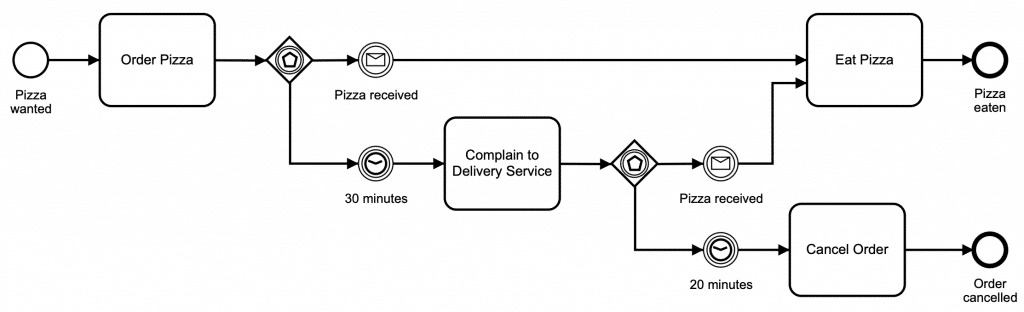
    BPMN is easy to understand even without knowing the formal specification. Take this Pizza Delivery process as an example:

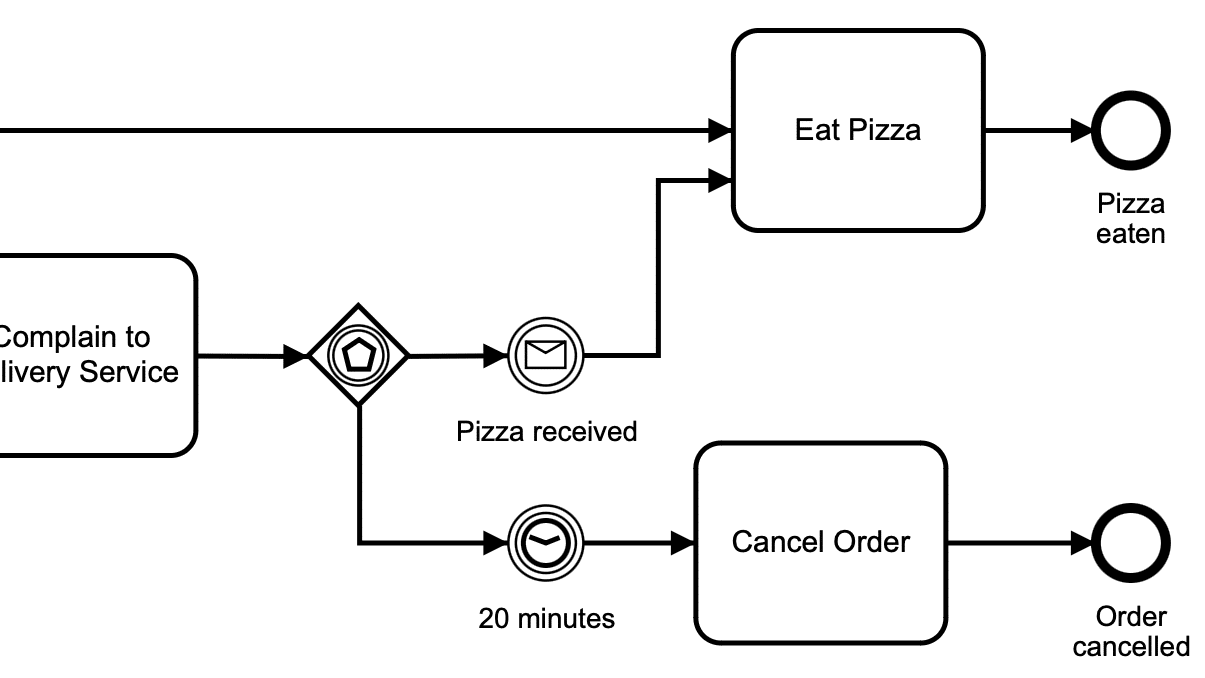
    Just by looking at the elements, visual hints and texts, it is clear that “after waiting 30 minutes and complaining to the delivery service, when the pizza hasn’t arrived after an additional 20 minutes, the order is cancelled.”

    It’s visual expressiveness qualifies BPMN not only as a notation standard, but also as a comprehensive documentation tool!

    Which, in turn, is its greatest pitfall: if only used for documentation purposes, BPMN models tend to transition into the digital filing cabinet quickly. Sitting and collecting virtual dust rather than being constantly updated and referred to.

    This is where Camunda comes in – an engine that can run BPMN and DMN models!

    Camunda SaaS and SAP BTP

    Camunda provides a cloud-based solution for both drawing and running BPMN- and DMN-models. In addition to the modelling capability, It provides so-called job workers representing a particular BPMN task of the model. Following the above Pizza example, the “Cancel Order” service task would create a job worker containing all relevant business and technical data to perform a cancellation of the order in IT systems.

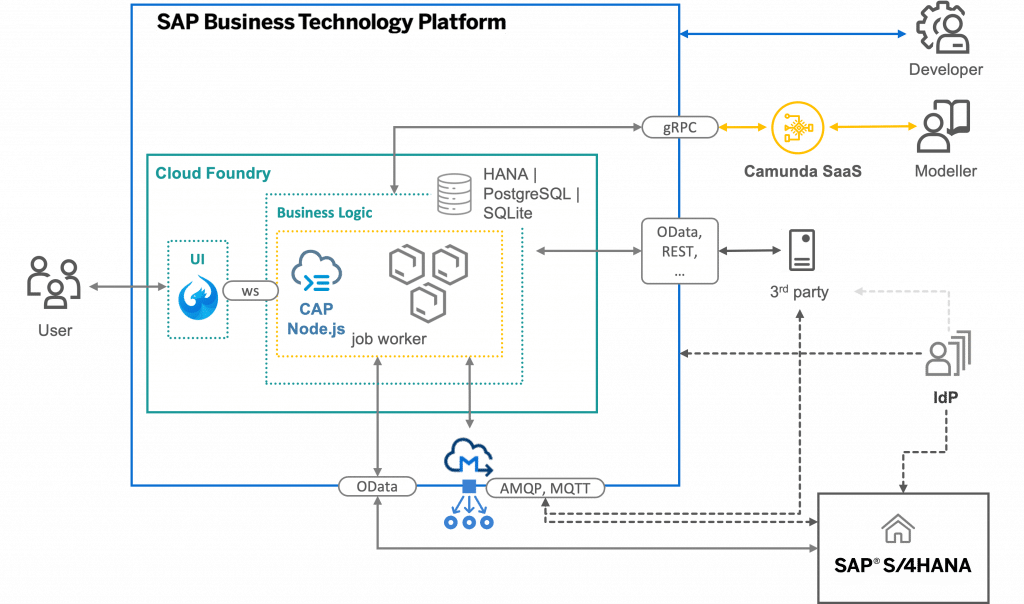
    It is now the task of a business logic runtime to perform the work associated with Camunda’s job worker – in our project, this is done by the CAP layer in SAP BTP. CAP is SAP’s “Cloud Application Programming Model” designed for building cloud-native applications. In our case, we utilized CAP’s Node.js flavour to provide Camunda with job workers, implementing the required business logic, including interaction with 3rd party and SAP S/4 HANA systems. Interfacing with the Camunda SaaS via gRPC creates a fault-tolerant, yet highly performant, integration between the business logic runtime and the process execution engine.

    On top of the business logic, a UI5-based User Interface provides user input to the running BPMN process where necessary. The CAP runtime updates the UI along the BPMN process, keeping the business process in sync with user interaction. By using web sockets for refreshing UI elements, the user experience becomes instant and blazingly fast.

    In addition to using OData- and REST-APIs for interacting with 3rd party and SAP systems, our solution uses the Event capabilities of BTP to both send and receive events from connected systems. This allows for quickly adding and removing event-capable business system, without having to connect APIs directly.

    By providing a CAP implementation for all major BPMN tasks, a literal platform was created that allows a very generic execution of runtime logic for business tasks – which in turn puts the Modellers into the driver’s seat. By creating BPMN and DMN models, the Modeller build a software application without having to write code: the definition of “low-code software development”.

    No code necessary: BPMN drives the software

    By separating BPMN modelling and execution from BTP business logic runtime, the key users never have to bother with technical implementations of their business processes. They model BPMN and DMN on the Camunda layer, never being burdened with technical configurations.

    Changes to the running application on BTP don’t require code changes and redeployments, but adjustments of the BPMN and DMN model only – an increase in flexibility and turn-around time benefitting the business users.

    In case there are updates necessary to the business logic runtime on BTP, developers can independently proceed from the modellers, not disturbing their work on the subject matters.

    No real SAP pendant no process-driven software

    Is there something from SAP serving the same purpose? Yes and No.

    “Yes”, because on a high level, there’s SAP Build Process Automation. It allows creating workflows and automations on BTP, similar to Camunda Modeller, and running them, similar to Camunda Process Orchestration.

    “No”, because SAP Build Process Automation is not providing BPMN- and DMN-capabilities, but a proprietary modelling standard. This requires upskilling on that proprietary modelling language, resulting in a lock-in for the modellers: all process design will only work in Process Automation, they’re not portable, nor universally valid.

    And again “No” because in terms of “orchestration” capabilities, Process Automation only provides a friction of the Camunda engine features. Controlling the workflow via APIs, interacting with other systems (S/4, 3rd party, etc) or in-process data handling is where Camunda truely shines. Also, Process Automation holds very few capabilities of running custom buiness logic in a process. It doesn’t follow the “job” pattern by handing out work to a technical runtime like Camunda does, but requires the “job” to run as part of the Process Automation execution. This quickly results in limitations for providing business logic results.

    Summary

    Our integration between Camunda SaaS for business process modelling and SAP BTP for runtime logic caters ideally to the target audiences: a well-know User Experience for end users, a domain-specific capability for key users, and a familiar environment for developers. All can work independent of each user, with code and models deployed separately, disjunct update cycles, and no hindering close coupling.

    Could this be a sustainable solution for generically running BPMN- and DMN-processes in BTP? Absolutely. There’s no technical reason why the solution only works for a specific customer. In fact, the solution has been so well-perceived that ideas started circulating for productising the Camunda-BTP-integration as a BTP “Add-On” for customers.

    We have already implemented this successfully. Read more about Costumer’s requirements and KPIs.

  • Recordings of re>≡CAP 2023

    Recordings of re>≡CAP 2023

    Here you find the recordings of the developer conference all around the SAP Cloud Application Programming Model (CAP). There are three tracks (one main track in the Audimax), and two side tracks:

    • All presentations that took place in the Audimax can be found here.
    • We have compiled the no less interesting two side tracks for you on this site.

    Side-Track 1

    Marianna Naboka und Tim Back: BAS: Productivity boost CAP & UI development

    Maximilian Hartig: Improve your workflow w/ cust. annotations

    Adrian Ngo und Alexander Hangl: Digital Services w/ CAP & Fiori Elements

    Maximilian Hartig: Join the hype: CAP & ChatGPT

    Johannes Vogel und Marcel Schwarz: Plugg. Express Middlewares & GraphQL

    David Kunz: A Leaner Approach To Draft

    Christoph Morgen und Frank Gottfried: Data Science handshake with CAP developer building an intelligent data app

    Dries Van Vaerenbergh, Gert Mertens, Wouter Lemaire: CAP Advanced Programming model

    https://youtu.be/yHxJTgSzNqg

    Christian Georgi und René Jeglinsky: What’s new in Capire – Docu Revamped

    Alper Dedeoglu und Martin Frick: Using CAP to develop multitenant SaaS applications on SAP BTP

    Marius Bertsch und Niklas Ullrich: Real-Life SaaS with SAP CAP?

    Jonathan Bregler: Unleashing the power of SAP HANA Cloud in CAP applications

    Side-Track 2

    Richard Lindner: cap-js-community: mtx-tool & feature-toggles

    Adrian Görler und Matthias Schur: Upserts for mass and delta uploads

    Marc Becker: Running Java Apps as Native Executables

    Robin de Silva Jayasinghe: Optimize cap2cap communication with HCQL

    Wolfgang Koch und Marten Schiwek: Data Privacy Integration in CAP

    Johannes Vogel und Patrice Bender: Node.js: New DB layer incl. PostgreSQL

    Marika Marszalkowski und Matthias Kuhr: SAP Cloud SDK: How it enables Service Consumption in a CAP App

    Marten Schiwek und Wolfgang Koch: Monitoring & Tracing via Open Telemetry

    Jan Müller und Marcel Schork: A modern dev. work-flow for SAP Cloud Integration with CAP & Azure

    Nick Josipovic: Change Tracking with CAP

    Vladislav Leonkev: BDD with Cucumber

  • Data Modeling Options in ABAP – A Beginners Overview

    Data Modeling Options in ABAP – A Beginners Overview

    TL;DR: In this Blogpost we will look at some data modeling methods to be used in ABAP programs. While other methods are more intuitive and easy to learn, the preferred method for experienced ABAP developers will usually be CDS Views.

    Development in ABAP, a programming language used for ERP purposes, will unavoidably intersect with the task of data modeling. While the ABAP application itself contains the processing logic of the data, the modeling can be done in various ways, either within or outside the ABAP code. This article is aimed at new developers that have yet to see the many options for creating data models to be consumed by ABAP programs. It is not intended to provide a detailed explanation of each modeling method, but rather to provide a quick overview of their usage and capabilities.

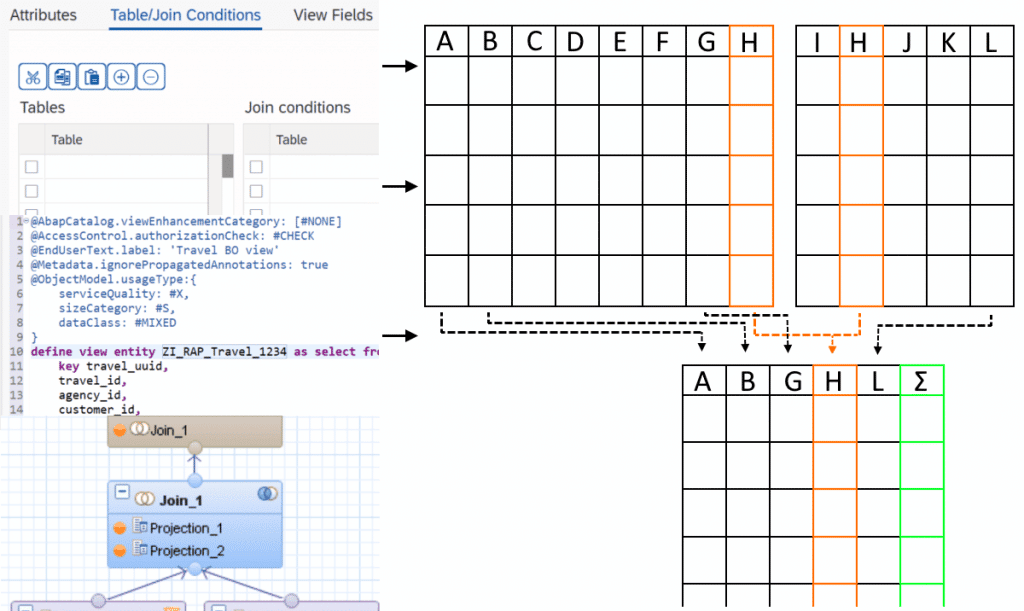
    Data modeling is the task of gathering data from various sources and combining and processing it into more concise data for the end user. As different data sources are often used in a similar context for different tasks, creating reusable models that can be consumed by different applications becomes a routine task. Reusable data modeling in ABAP-based programs is done using views. Like database tables, views are consumed in ABAP programs using Open SQL calls. In the following, we will be discussing the ABAP Dictionary View, the CDS View and the HANA exclusive Calculation View.

    ABAP Dictionary View

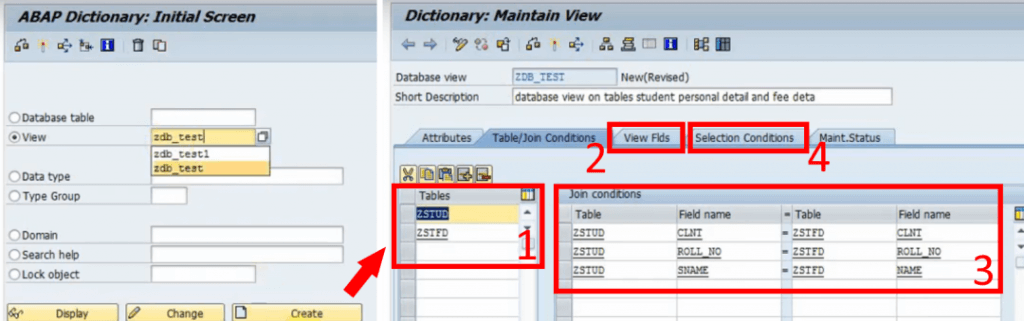
    The view most developers will be introduced to first is the ABAP Dictionary View. It is created with the ABAP Dictionary (SE11). It provides the option to choose several database tables (1) and collect them into a new table by choosing the desired columns (2). This is done by providing the shared columns (Join Conditions) of the underlying tables (3) and simple selection conditions (4). It does the bare minimum of data modeling; choosing which data should be displayed in a single table. The SQL equivalent of this is an inner JOIN. If your goal is to simply queue a few columns of related tables to be consumed by your ABAP code, the dictionary view is an easy way to do so.

    ABAP Dictionary View
    Fig. 1: Creating an ABAP Dictionary View with the ABAP Dictionary (left) and providing data sources and conditions for the view (right).

    While the ABAP Dictionary has some additional features like choosing the buffering type and inheriting field labels from its underlying data sources, any further processing of the data and supplementing technical information will have to be done in the ABAP program itself, either through lengthy SQL calls on the view or the ABAP List Viewer. The goal of data modeling is to reuse as much of the model as possible without having to code for each program individually. This makes the dictionary view the least efficient option but the easiest to understand and access since it is a simplified standard tool of the SAP GUI. It does not require any additional program or coding experience but has the fewest options.

    CDS View

    With the introduction of the powerful HANA databases, SAP developed views, designed for pushing computational tasks from the application layer (the ABAP program) to the database. These new views provide a lot more SQL features that not only improve performance but were also attractive for modeling purposes. But these Core Data Services (CDS) Views are not exclusive to HANA. A generic version, ABAP CDS, can be used database-independently and still provides most features of the HANA-specific CDS Views. They have a crucial role in modern SAP architecture. SAP S/4HANA uses models specifically built around CDS Views e.g., building entire Fiori Apps with the Restful ABAP Programming model. Even today, CDS is further evolving with quality-of-life improvements like CDS View Entities, a new, advanced CDS View type that provides more features and removed some redundancies of CDS Views.
    Creating and maintaining CDS Views is only possible with the ABAP Development Tools (ADT) accessible through Eclipse, but viewing them is still possible with the SAP GUI. They can be consumed by any ABAP program with Open SQL.

    Modeling and features

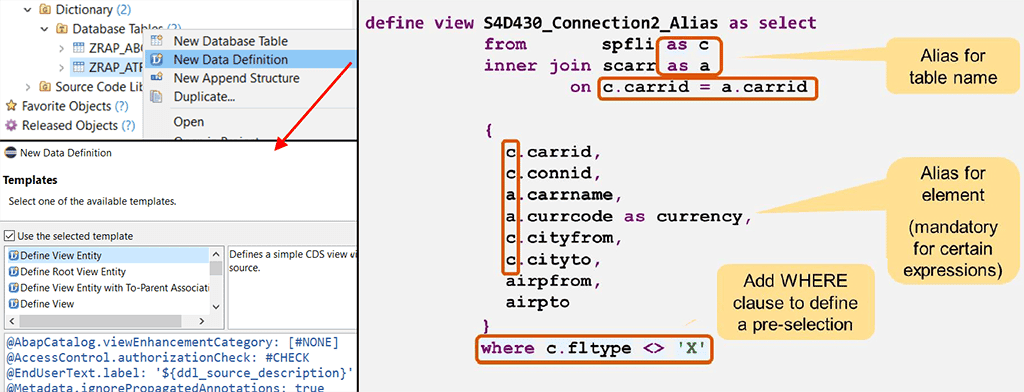
    So, what are these features, and what does a CDS View look like? An example can be seen in the image below. The first noticeable difference to ABAP dictionary views is: It is code-based. Every detail about the view is written down in a new line of code instead of clicking through menus and buttons. This is not limited to just the content of the view but also its technical properties. Let us start by looking at the core of a basic CDS View. You provide the source tables, the columns to be displayed, optional aliases, and a filtering condition for the data to be retrieved. One might say that it is just an SQL code. Because it is.

    CDS View
    Fig. 2: Creating a CDS View in ADT (left). Core structure of a CDS View (right)1.

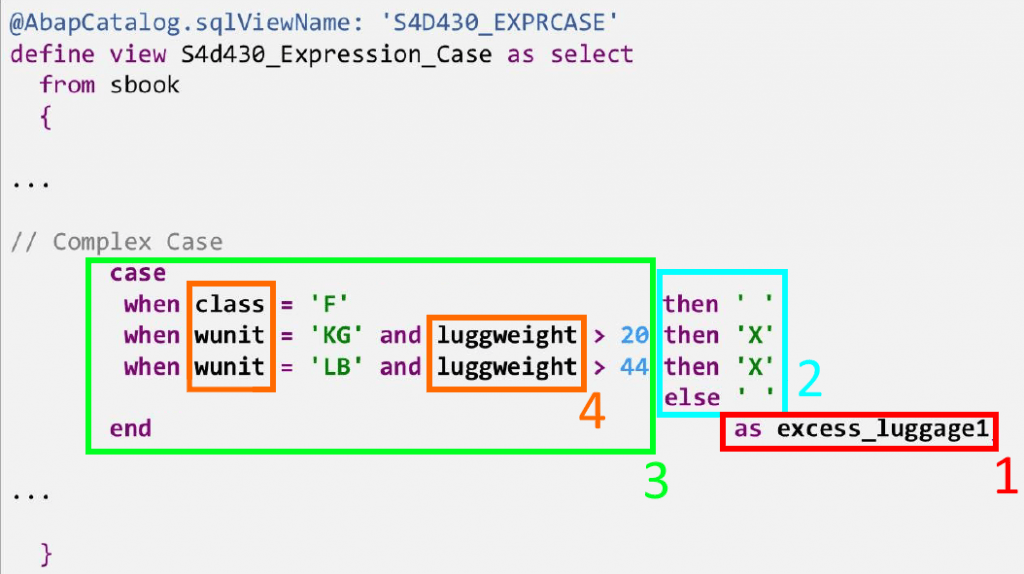
    As with SQL in ABAP programs, CDS Views include features like expressions and functions. The example below shows how a CDS View defines a new column (1), whose value (2) depends on a more complex logical case expression (3) using data (4) from the underlying source tables. Arithmetic expressions (additions, divisions, etc.) and functions (rounding, modulo function, etc.), string functions (substring, word length, etc.), aggregations, and many other SQL features are, of course, also possible.

    within a CDS View
    Fig. 3: Complex case expression within a CDS View

    Annotations

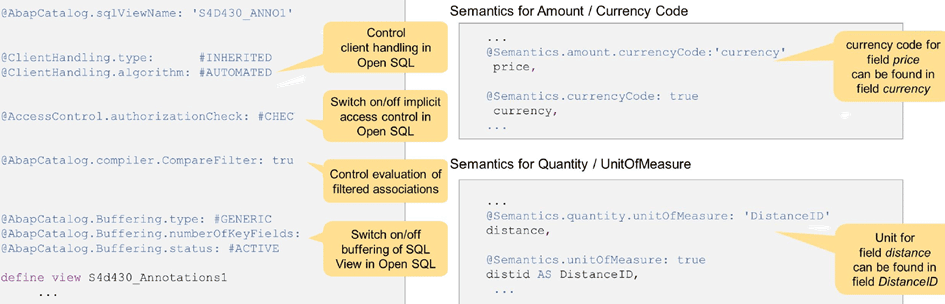
    CDS features are not limited to the capabilities of SQL. The View can be enriched with semantic information using annotations. Annotations are simply expressions that define a property of the entire view or one of its elements, preceded by an “@“. Examples for both can be seen in the image below:

    • Setting buffering options for the view.
    • Specifying access control for when an ABAP program calls the view.
    • Defining the relationship between a column containing a value and the column containing the corresponding unit or currency. 
    Fig. 4: Annotations in CDS Views.1

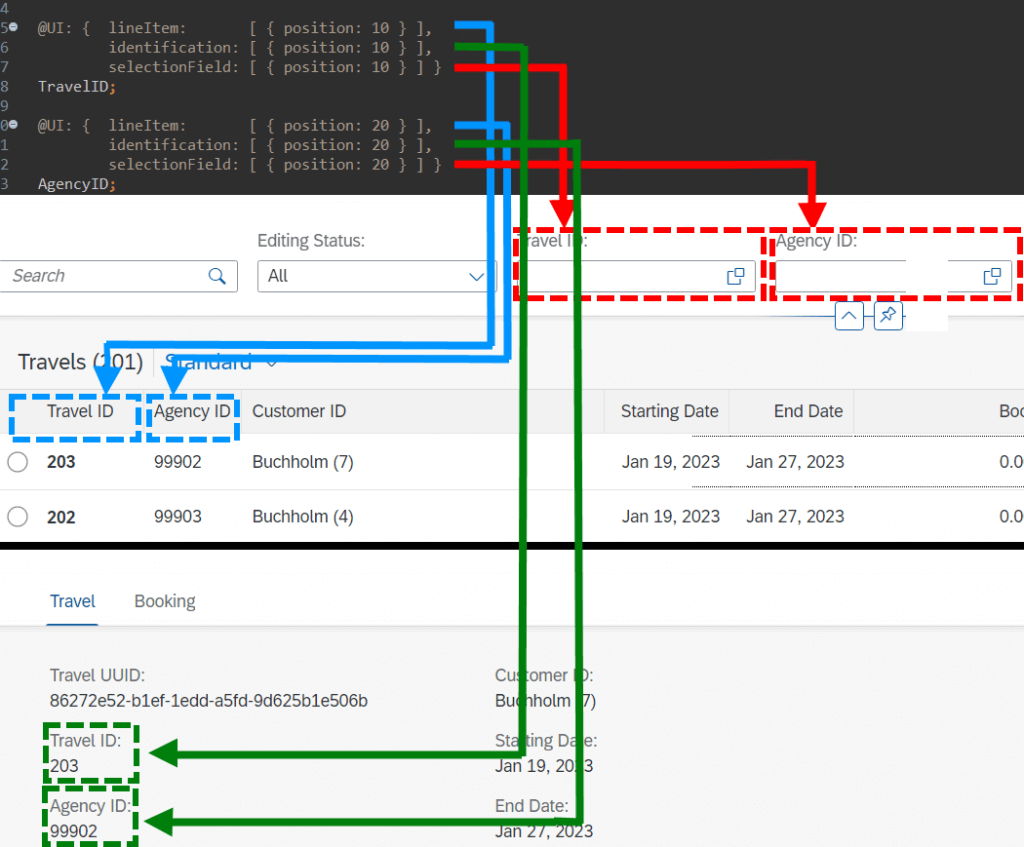
    These make up only a very small fraction of all annotations. The possibilities range from general technical information to Framework-specific annotations e.g., how a User Interface should display an element of the view. They allow the Backend Developer to design entire SAP Fiori App UIs with relative ease. The image below showcases example annotations on the TravelID and AgencyID columns of the classical SAP ‘Travel Scenario’ to define some UI properties without any frontend coding:

    • @UI.lineItem to add the element to the list view of entries
    • @UI.Identification to add the element to the object page of a selected entry
    • @UI.SelectionField to add a search field for the element to the UI
    UI in CDS View
    Fig. 5: Designing UI elements in CDS with annotations.

    Some additional features

    Listing all the capabilities of CDS views would take too long and is not in the scope of this simple introduction. But to finish off, here are a few further interesting capabilities of CDS:

    • CDS Views can define input parameters that the consuming ABAP program can then provide.
    • They allow you to define which data should be accessible to which user roles. Before, this had to be done within the ABAP program itself (statement ‘AUTHORITY-CHECK’).
    • CDS Views can be enhanced. For example, a customer can create an Extention View (same structure and syntax) that adds further columns and semantic information to the view.
    • CDS Views can use other CDS Views as data sources. This is not possible with ABAP dictionary views.
    • Building views is not limited to just consuming database tables on the system. CDS Views can for example, queue data remotely through OData services.
    • A new, advanced type of relationship between data sources, called ‘Associations’. Compared to Joins, they can provide further information, like the cardinality between data sources. Furthermore, they act like a ‘Join on demand’, meaning the view can just show the ‘main’ data source and only joins the additional sources, if they are requested.

    Calculation View

    As SAP HANA completely changed the capabilities of databases, the design principles for previous programs and services became obsolete and inefficient. The goal of HANA is to push as much workload as possible away from the application layer to the database. To do this, SAP created a dedicated view called HANA Views, the most prominent one being Calculation Views. Both CDS Views and Calculation Views are designed to create the data model and all its logic on the database and send the results to the consuming program. CDS HANA Views are handled on the application layer but generate the actual model on the database, while Calculation Views are handled directly on the database and then consumed by the program. A more important difference for the developer is the modeling.

    Modeling

    The most glaring difference is that it is graphical. For most purposes, modeling of calculation views can be done almost exclusively without any code. Like with dictionary views, you set properties by clicking through menus, but it comes with a more intuitive graphical interface. Calculation Views can only be created, edited, and viewed in HANA Studio (deprecated) and SAP Web IDE (new versions).

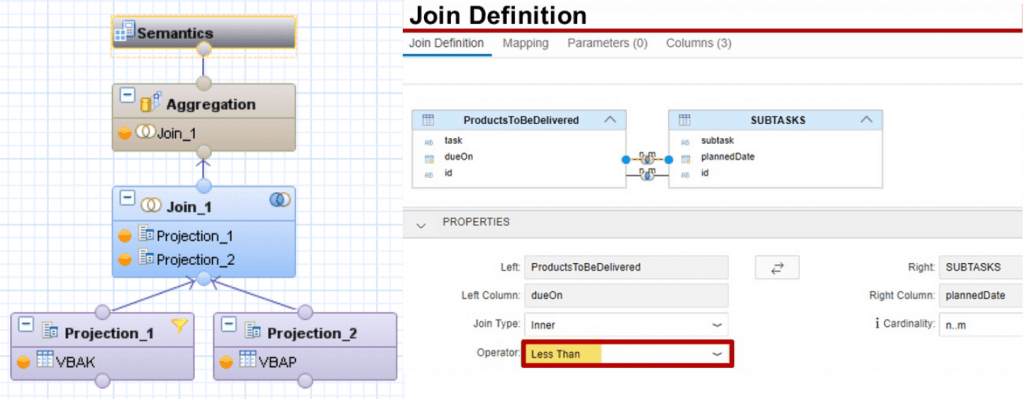
    Each modeling step is done with a node. To get an overview of the modeling, let us look at the image below, which shows a simple case of joining two data sources. The first layer consists of two Projection nodes. Each of them selects columns from one data source to be projected to the next layer. On the second layer, a Join node combines the data sources. By navigating to the Join menu, the Join Condition and additional details like cardinality and Join type are set. On the next layer, the data is aggregated; only the sum, maximum, minimum, etc. of grouped entries is displayed by carefully defining the aggregation order and conditions. At the top level is always the Semantic node that is used to define the behaviour and meaning of each column of the final view to be consumed. Similar to annotations of CDS Views, the Semantic node can be used to provide a large variety of technical information to individual columns, like currency codes, labels, data types, data masking, and many more.

    Fig. 6: Layers for the creation of a calculation view (left)2 and Join Definition for a Join node (right)3. Images unrelated to each other.

    While modeling Calculation Views can take some time to learn simply due to their many features, an advantage over CDS Views is that they require no coding experience. Learning it can be more intuitive, making it especially attractive for data modelers who are not necessarily ABAP developers.
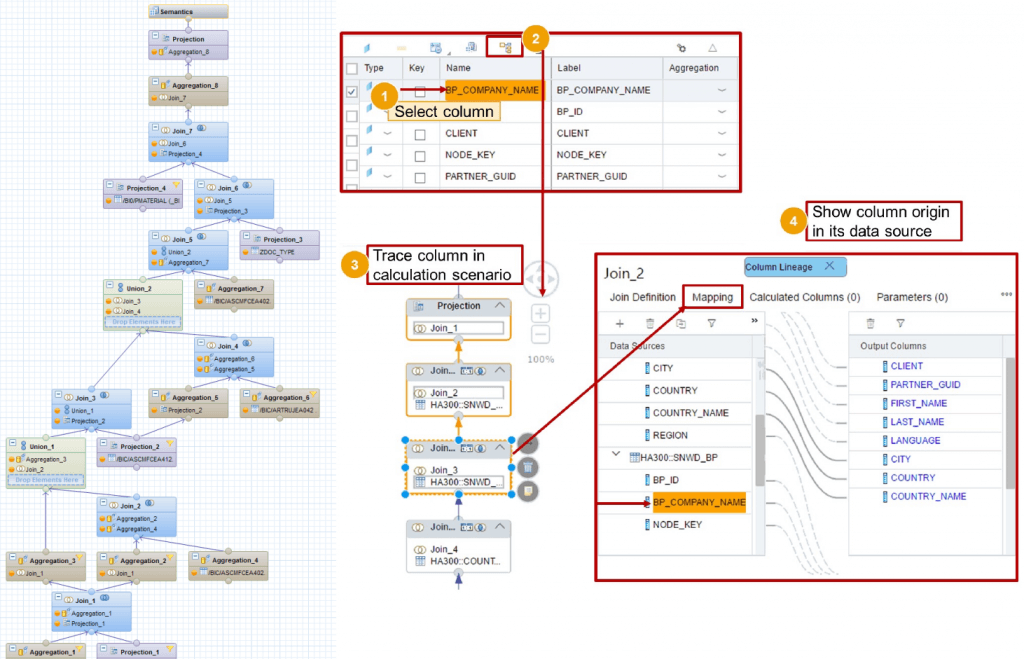
    Another possible advantage of calculation views can be considered by looking at the image below. Convoluted models with many Join and processing steps could be confusing to work with. Having the entire model displayed in one diagram could be easier to follow than an equivalent script-based model. To further simplify this, calculation views allow the modeler to follow a column at higher node levels to track back to its origin.

    Calculation View
    Example of a more complex Calculation View (left) 4.  Showing the Lineage of a view (right).3 Images unrelated to each other.

    Some last points

    The features provided by Calculation Views are numerous. Like with CDS Views, entire books are written about their capabilities. This article is merely a short overview but some further noteworthy points regarding Calculation Views:

    • Like with CDS Views, parameters can be defined.
    • Calculation Views can use other Calculation Views.
    • You can provide access control at the database level through so-called Analytic Privileges.
    • More complex features, that are not covered in the graphical model, can be supplemented with Functions and Procedures, reusable blocks of SQLScript code, that can be consumed in any Calculation View and even be used directly in ABAP programs using special methods called ABAP managed Database Procedures (recommended) or by creating a proxy object for the procedure (outdated).
    • HANA Views fully utilize the capabilities of SAP HANA. They are designed to get the best performance out of its in-memory technology but also have full access to the integrated Application Function Libraries, a series of C++ procedures designed to handle complex computations with great performance. Note that the usage of each library (Business Function Library, Predictive Analysis Library, Automated Predictive Library, Extended Machine Learning Library) requires its own license.
    • During the early phases of HANA Views, Analytic Views and Attribute Views were used to handle the measures (quantities) and the corresponding dimensions (elements describing the measures like customers, products etc.), respectively. These were later integrated into Calculation Views and are now obsolete. Also deprecated is the fully scripted Calculation View.

    A disadvantage of Calculation Views is that they cannot be used with Open SQL. For an ABAP program to consume them, it will require an intermediate step. Some of those are:

    • A Native SQL interface like ABAP Database Connectivity (ADBC) must be called within the program.
    • Creating a Proxy Object for the view, an External View, which can be consumed with Open SQL.
    • Consume the Calculation View in a CDS View using a CDS Table Function, then consume the CDS View in the ABAP program.
    • While Calculation Views can be used by ABAP programs, they are not managed by ABAP and thus require a separate lifecycle.

    Summary

    Let us summarize the advantages and disadvantages of each option:

    • ABAP Dictionary Views are easy to understand and available as a standard tool in the SAP GUI, but provide very few options. Further modeling requirements will unavoidably have to be done in the ABAP program. Good for beginners who only want simple Joins.
    • CDS Views have far more features that not only provide more capabilities but are also more comfortable to use once one is used to them. They are perfectly usable with ABAP but require ADT and knowledge of SQL-sublanguages (DDL, DCL and DML) to code them properly. Good for experienced data modelers that want to use the full scope of modeling features in ABAP programs.
    • Calculation Views are a code-free alternative to CDS Views regarding its features, but they can be only used with HANA databases. It requires the use of the SAP Web IDE, and consumption in ABAP code needs an intermediate step. Good for data modelers who are not experienced in ABAP and CDS or simply prefer graphical over scripted modeling.

    References:
    1. Sap Learning Course S4D430
    2. http://teachmehana.com/sap-hana-scripted-calculation-view-sql/
    3. Sap Learning Course HA300
    4. https://businessintelligist.com/2019/04/22/sap-hana-connector-tip-to-improve-performance/