Deprecated: Creation of dynamic property Pusher\Log\Logger::$file is deprecated in /html/wordpress/wp-content/plugins/wppusher/Pusher/Log/Logger.php on line 18
Deprecated: Creation of dynamic property Pusher\Log\Logger::$file is deprecated in /html/wordpress/wp-content/plugins/wppusher/Pusher/Log/Logger.php on line 18
Deprecated: Creation of dynamic property Pusher\Dashboard::$pusher is deprecated in /html/wordpress/wp-content/plugins/wppusher/Pusher/Dashboard.php on line 68
Deprecated: Creation of dynamic property Pusher\Log\Logger::$file is deprecated in /html/wordpress/wp-content/plugins/wppusher/Pusher/Log/Logger.php on line 18
Deprecated: Creation of dynamic property Pusher\Log\Logger::$file is deprecated in /html/wordpress/wp-content/plugins/wppusher/Pusher/Log/Logger.php on line 18 ABAP Archives - j&s-soft
A significant portion of ABAP programming is selecting data from database tables and reconstructing them for specialized use cases. Information shown to the consumer of the program is temporary fields, calculated using persisted data as input. Since the development of the HANA database, SAP changed the approach to accessing and calculating data in their programs and advises developers to do so as well. Most notably, the “Code to Data” paradigm aims to move unnecessary data retrieval and calculations from the application server to the database server. Calculated fields – be it through arithmetic calculations, string manipulations or complex case expressions – can now be provided without even accessing the ABAP layer. This is still a relatively new concept to many developers, as most of the code they have written so far juggles the retrieved data in ABAP code. For maximum time efficiency, new methods must be learned, some of which I will briefly explain. This blog does not contain an introduction with examples of either method, but merely describes the function and its cases of use.
CDS Views Core
Data Services (CDS) is the key component of all data modeling in HANA. While widely known, some developers still treat it as a mere join on database tables, unaware that CDS is a fully-fledged SQL language, that is also relatively easy to learn. Anything previously done in Open SQL can be directly implemented in the view without the use of any ABAP. It also provides annotations a consumer can utilize. Multistep operations might require the use of several CDS views, creating a view stack that can become hard to read.
ABAP Code
In special cases, it might still be necessary to use ABAP code to retrieve and calculate data. In fact, some of the new HANA tools are made specifically for ABAP. CDS custom entities are data definitions that do not use SQL. Unlike CDS views, they have no data source but gather the data from ABAP code (which, of course, can include data sources). It requires a dedicated class that implements the query in detail, including counting and paging. Custom entities are primarily used when SQL is incapable of retrieving the requested data, for example, from a remote data source that can only be accessed by ABAP code or when the business logic is simply too complex for SQL. The finished custom entity can then be used like any other data source. It is like a temporary data view that is calculated in the ABAP code. In the context of RAP, CDS views can make use of virtual fields that are calculated in dedicated ABAP classes. The regular fields of the view are used as input to calculate the virtual field for each row individually. A simple example would be an adjusted price to a base price that is fetched from the database. In contrast to customs entities, they are only single fields of a view, not an entire data source.
SQLScript Code
For cases when CDS views are not sufficient to push down ABAP code to the HANA database, methods to directly program on it have been developed. The HANA database has its own version of SQL, SQLScript, which is considerably closer to a full programming language than ABAP SQL. Database developers that create HANA views are already familiar with this language, but the ABAP language also provides access to it. Special methods called ABAP-managed database procedures (AMDP) allow the use of SQLScript code. It is written on the application layer but executed on the database layer. One dedicated use of AMDPs is table functions. They fetch and calculate data on the database through SQLScript and provide the result as a temporary table. In contrast to customs entities, all of this happens on the database. It provides more capabilities than CDS and Open SQL and even allows the use of special HANA tools like machine learning libraries. If optimal performance is desired, AMDPs should be preferred over the ABAP code. Of course, it requires learning a new language, which has a lot more depth to it than other SQL languages.
Parallelization of programs is typically not a problem ABAP developers encounter frequently. In most cases, database access via OpenSQL has a much greater impact on report performance than processing and outputting the data. Nevertheless, there are scenarios where parallelization can dramatically speed up processing. To demonstrate the fundamental workings of parallelization, I chose the visualization of the Mandelbrot fractal. The Mandelbrot fractal is probably the best-known example of its kind and an excellent example of a process that can be parallelized. But first, the basics need to be clarified: What exactly is parallelization, and what prerequisites must a process meet to benefit from parallelization?
Serial and Parallel Processes
Typically, ABAP programs and reports are processed serially. This means the program is executed line by line sequentially. A typical report reads parameters from the selection screen, selects corresponding data from the database, processes it, and outputs it. Loops are often used to handle the processing of many elements. The program processes all database entries one by one, as shown in the following diagram::
Figure 1: Serial Processing
Loops are a good indicator that processing steps could potentially be parallelized. The prerequisite is that the process steps are independent of each other, meaning one loop iteration does not affect the result of another. This can be enforced, for example, by using separate tables for the data read from the database and the results, with a 1:1 assignment. The flow of a parallelized report might look like this:
Figure 2: Parallel Processing
Since the processing steps illustrated in the diagram occur simultaneously, the program runtime is dramatically reduced. Program parts that run in parallel are also called threads. Unfortunately, not all processes can be parallelized equally well. Designing a program flow that can be processed in parallel is a science in itself, but here are some examples of processes that are more or less suitable for parallelization:
Better Parallelizable
Less Parallelizable
Calculating salaries for many people
Calculating salary and tax for one person
Calculating salary and remaining vacation days for one person
Calculating the sum of all employees’ salaries
ABAP-Threads
The next question is how to parallelize processes in ABAP. The programming language itself does not provide simple syntax to describe parallel execution of program parts. This is where the ABAP-Threads framework comes into play. It enables parallel processing through a mechanism that starts a new dialog process in the background for each thread. This means the maximum number of concurrently running threads depends on the maximum number of dialog processes available in the system. If too many threads are started, there may not be enough dialog processes left for other users. This must be kept in mind. If in doubt, the parameter rdisp/wp_no_dia in transaction RZ11 can be checked. It contains information about the maximum number of dialog processes in the system. Threads always use a dialog process, even if the report itself is started as a batch process in the background.
ABAP-Threads can be imported into the system using ABAP-Git. Here is the link to the GitHub repository: ABAP-Threads
The programming concept of ABAP-Threads is based on so-called workers. For each thread, a worker object must be created. This object is an instance of a worker class in which the parallel program code is implemented. The worker class inherits from the abstract class ZCL_THREAD_RUNNER_SLUG and has the following core components:
A single attribute (member variable) where all parameters required for the subtask and the results are stored. This serves as the data interface for the worker and should use a structure as its data type.
The method CREATE, which creates the worker instance and copies the parameters into the attribute. (The constructor cannot be used for technical reasons.)
The method GET_STATE_REF, which returns the reference to the attribute.
The method RUN, which contains the program code to be executed in parallel.
Figure 3: UML of the Worker Class
The attribute of the worker class serves as the sole interface for data exchange between the main program and the worker. This also implicitly ensures that there is no communication between worker instances. This restriction helps avoid common pitfalls in parallel programming, such as race conditions or deadlocks. However, it also means that the partial results of the workers may need to be copied back into a local variable of the main program after processing, which involves some overhead.
The program flow for parallel processing using ABAP-Threads typically looks like the diagram below:
Figure 4: Steps of a Parallel Program with ABAP-Threads
Implementation Using the Mandelbrot Fractal Example
Parallelization Strategy
To parallelize a process, a strategy must be developed to split it into many smaller subprocesses. First, the dependencies in the process need to be examined. For instance, it would not be possible to calculate net salary before gross salary because the net salary depends on the gross amount. In the case of the Mandelbrot fractal, each pixel in the image is practically independent of the others, providing a lot of flexibility to distribute the work among almost any number of workers. In this example, the image is split horizontally and assigned to the workers.
The image data is generated using a helper class capable of producing a file in bitmap format. The color of each pixel can be directly controlled and described in binary format or as HSV (hue, saturation, value). There are numerous resources online regarding the algorithm for generating the Mandelbrot fractal.
The Worker Class
The attribute of the worker class uses the structure t_data_and_parameters, which includes both the parameters necessary for image generation and the image data for the horizontal segment of the image. The definition is located in the public section, as it is also needed outside the class.
The attribute itself should then be defined in the private section:
The CREATE and GET_STATE_REF methods are redefined and implemented according to the schema. In the redefinition of the RUN method, the algorithm is implemented to generate the image segment based on the parameters in the attribute and save it back into the attribute. The image rows are iterated over, and the color of each pixel is determined using a Mandelbrot helper class.
The Report
After implementing the worker class, it can be used in a report. First, worker instances are created using a loop. They can then be started with the RUN_PARALLEL method. To simplify later access, the references to the workers are stored in a table. In the code snippet, the worker class is called LCL_PARALLEL_RENDERER.
The program then waits until all workers are finished. A worker completes its task once its RUN method exits. This can be checked using the IS_READY method.
Subsequently, the partial results can be combined into a complete image. The result is a full representation of the Mandelbrot fractal displayed as a bitmap in the SAP GUI:
Performance
The most interesting part: How much performance improvement can be achieved through parallelization? To answer this, multiple benchmarks were conducted on a test system. For each thread count, five measurements were taken, and the average was calculated. The system runs on a virtual machine with 24 vCores. The number of dialog processes is limited to 8, with one reserved for the report itself. The results are shown in the following two diagrams. The standard deviation of the measurements is negligible and is therefore not included in the representation.
It is evident that processing speed increases with parallelization. However, the relationship between the number of threads and performance improvement is not linear. This is due to the potential for optimization in the parallelization strategy. The naive approach of assigning an equal number of image rows to each worker is suboptimal because the algorithm for generating the image is recursive. Image areas containing black pixels require significantly longer calculation times than the rest. The bottleneck is the worker that takes the longest. For this reason, processing speed increases beyond seven workers. Even though only seven workers can run simultaneously, threads that finish their image segment early can take over the next part. The overhead from creating worker instances and copying image data is negligible in this example.
Conclusion
In conclusion, parallelization using ABAP-Threads is an effective way to significantly improve process execution speed. However, the performance gain depends heavily on the parallelization strategy. Additionally, knowledge of system hardware and configuration of the maximum number of dialog processes is essential to avoid conflicts with other system users. Parallelization is primarily useful for offline scenarios when the system load is low. For instance, updates or time-critical processes can be accelerated when they would otherwise not fit within the available timeframe. In a productive system’s normal operation, it can block other processes and reduce available computational power for other users, so parallelization should be used cautiously.
TL; DR: In this ABAP beginner’s blog series, you’ll learn the fundamental concepts of internal tables (ITABs) and how to use them effectively in ABAP programming to store and manipulate data.
An internal table in ABAP is a dynamic data structure used temporarily during the runtime of an SAP program to process possibly large volumes of data. It stores multiple data records in rows and columns with a consistent structure and key. Internal tables (ITABs) are accessed using keys and are discarded when the program execution ends. They serve as temporary storage areas, allowing data modification as needed. The size of ITABs is flexible and handled by the ABAP runtime system. These tables can have multiple rows. ITABs, depending on the table type, are consisting of various fields, including non-unique keys, allowing duplicate records. They are employed for calculations, quick data access, and versatile applications.
In this section, we explain some basic uses of ITABs with an example and their results. Let’s assume, a friend is coming on a short visit to Germany, seeking to explore both vibrant places and scenic hiking trails. To meet the perfect itinerary, we have compiled the following list of ten popular places to visit in Germany that offer nearby hiking opportunities:
State
Place
Trail
Brandenburg
Berlin
Briesetal
Bavaria
Schloss Neuschwanstein
Allgaeu
Baden-Wuerttemberg
Black Forest
Black Forest
Hessen
Ruedesheim
Rheinsteig
Bavaria
Munich
Partnach Gorge
Saxony
Dresden
Painter’s Way
Bavaria
Nuremberg
Goldsteig
Baden-Wuerttemberg
Heidelberg
Albsteig
North Rhine-Westphalia
Cologne
Eifelsteig
Rhineland-Palatinate
Trier
Moselsteig
Based on this table, we are going to explore the basic uses of ITABs by answering the following questions:
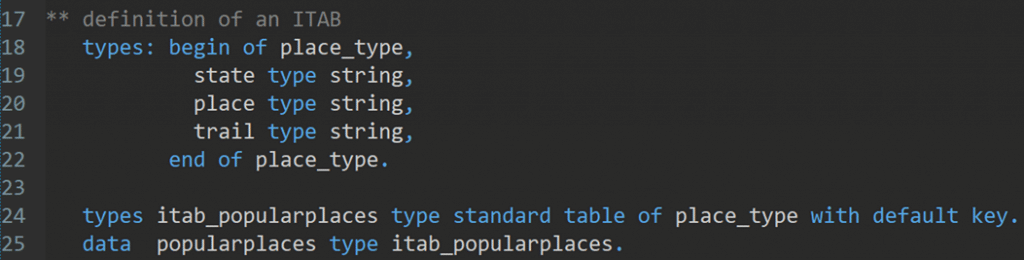
At the beginning, we defined a structure ‘place_type’ which includes three fields: state, place, and trail with respective data type. Next, the ‘itab_popularplaces’ is declared as the data type for the ITAB, which allows multiple lines and maintains the entries in the order they were inserted. Finally, the ‘popularplaces’ is the variable that represents the actual internal table, instantiated using the ‘itab_popularplaces’ data type. It will hold the data records, where each entry will follow the structure defined by ‘place_type’.
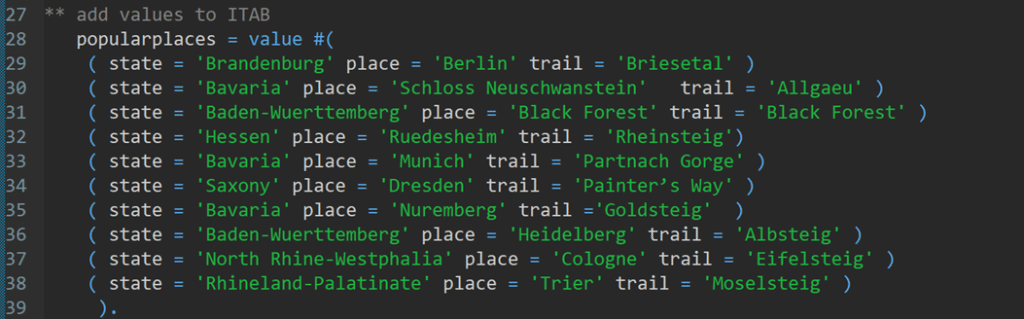
1. How can we add the values to the internal table?
Solution: We populate the ITAB component by component with VALUE operator. Here is the sample program to populate the ITAB.
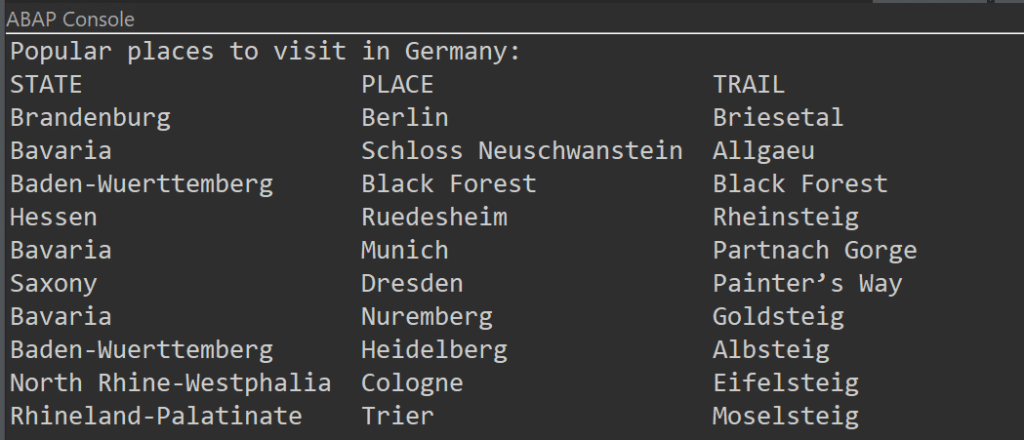
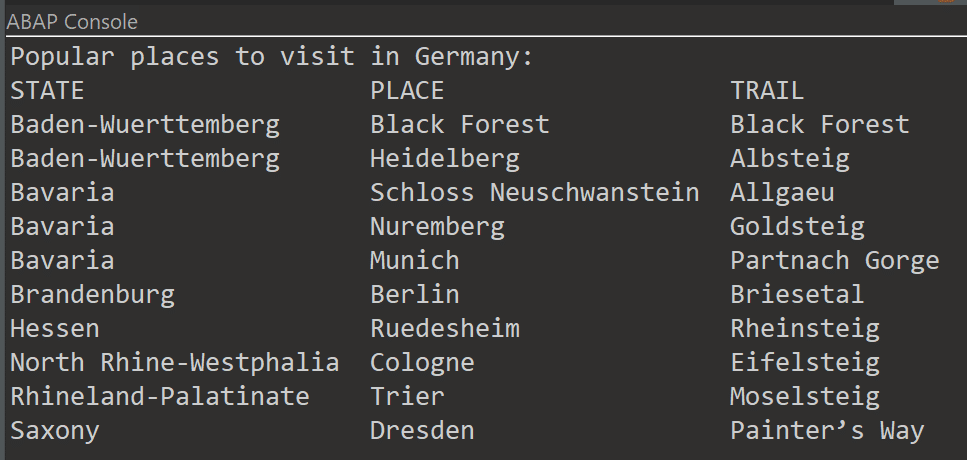
We can print the ITAB in the ABAP console using the commands:
The output:
2. How can we append a new row to the ITAB?
Suppose we have a new suggestion about a place, and we want to append the row to the ITAB.
State
Place
Trail
Saxony-Anhalt
Magdeburg
Goethe way
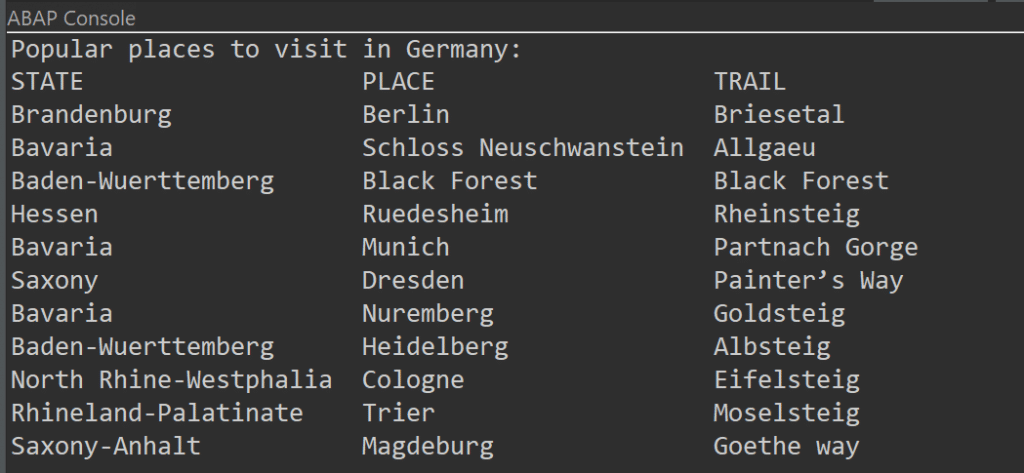
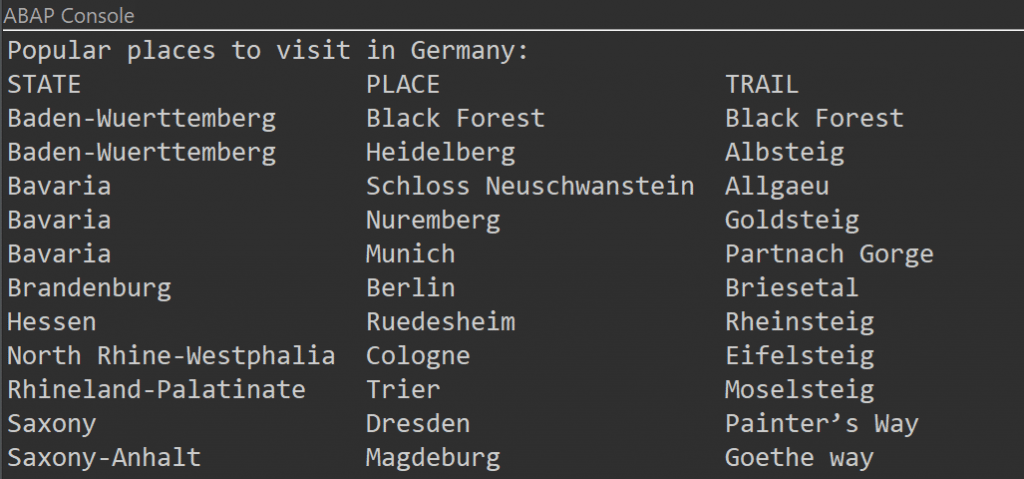
Solution: We can append a new row at the end of the ITAB with APPEND operator.
The output:
3. How many lines does the ITAB contain?
We can count the lines contain the ITAB by using following sample program:
The output:
4. How can we sort the ITAB?
In ABAP, we can sort the ITABs by using SORT operator. This sorting can be done based on column and ascending-descending order. In this example, we have sorted by column ‘state’ in ascending order.
The output:
5. How can we read a row from the ITAB that contains a specific value?
There are multiple ways to read any specific row from the ITAB, providing flexibility in how the data is retrieved and manipulated. In this example, we have used a loop…endloop statement to read the specific row in the ITAB that contains the place ‘Berlin’.
The output:
6. How can we delete one row from the ITAB?
We can delete any row from ITAB by using DELETE operator, including specifying the row number. For example, we can delete index 11 with the following command line.
The output:
7. How can we delete duplicate rows?
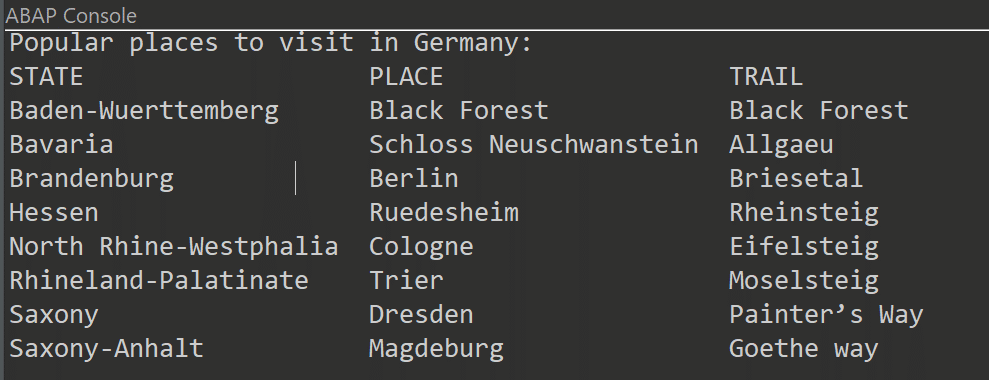
In ABAP, the DELETE ADJACENT DUPLICATES statements give us the ability to remove all consecutive lines, excluding the first occurrence. Prior to utilizing these statements, it is essential to perform suitable sorting of the data. For this example, we have chosen state column and the duplicate states (e.g., Bavaria) are deleted.
The output:
In conclusion, ITABs are a crucial part of ABAP and particularly important to store and format data from a database table within a program. Are you ready to dive into ITABs – the essential building block of ABAP development? Keep your eyes on our beginner blog series!
The following exercises will help you understand some basic concepts in ABAP.
“Tell me and I forget, teach me and I may remember, involve me and I learn.”
Benjamin Franklin
On exercism.org you will find 40 ABAP exercises. These are common programming exercises such as Word Count, Tic-Tac-Toe, Scrabble Score and so on that you will probably come across in one way or another when learning a programming language. We recommend that you register there and start doing all these exercises to build up your knowledge of programming and ABAP.
What our blog series Introduction to ABAP will do for you:
Discuss the task and the considerations you need to make to solve the exercise without having to look up a published solution.
Randomly show you some ABAP peculiarities that come up in each exercise, so that you understand ABAP better and better.
Work out the prime factors of a given natural number.
A prime number is only evenly divisible by itself and 1.
Note that 1 is not a prime number. Some more useful school knowledge: Factors are the numbers you multiply together to get another number. For example: Factor 2 * Factor 3 = 6. “Prime factorisation” is working out which prime numbers can be multiplied together to make the original number.
2. An example to help you understand in depth.
What are the prime factors of 147?
It’s best to start with the smallest prime, which is 2, so let’s see:
Can we divide 147 exactly by 2? 147 ÷ 2 = 73½ No, you can’t. The answer should be an integer, and 73½ is not an integer.
Let’s try the next prime number, 3: 147 ÷ 3 = 49 That worked, now we try to factor 49.
The next prime number, 5, does not work. But 7 does, so we get 49 ÷ 7 = 7.
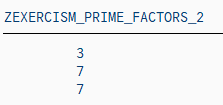
This is as far as we need to go, because all the factors are prime numbers. 147 = 3 × 7 × 7
Now you have a better understanding of this problem. Have you?
3. What are the constraints of the task?
There is no need to scroll up to see the task again. Here it is:
Calculate the prime factors of a given natural number. A prime number is only evenly divisible by itself and 1. Note that 1 is not a prime.
line of code
constraint
coding
1
an input (natural number) is given.
input (natural number)
2
there will be an output of prime factor(s)
output
3
The smallest prime is 2, that is why we will start prime factorization with divisor 2.
divisor = 2
4
How do you get only evenly divisible numbers? Answer: by using the modulo operation (“MOD” or “%” in many programming languages). The modulo operation is the remainder of the division.
For example, 5 mod 3 = 2, which means that 2 is the remainder when you divide 5 by 3. If there is a remainder, the number hasn’t been divided equally. For our problem, we would need 5 mod 5 = 0. No remainder, so evenly divisible.
More generally: Input MOD divisor < > 0, tells us that the input is not evenly divisible by this divisor and therefore we can’t proceed, we need to change the divisor.
if input MOD divisor < > 0
5
We try the next possible divisor, so add 1 to it and try again.
do divisor + 1, start again at line 3
6
If input MOD divisor = 0, store divisor as prime factor in our output or in other words: if line 3 of the code is not true (else) store divisor as prime factor in our output
else write divisor as prime factor in our output
7
Since we have found a prime factor, we can proceed, so we actually divide the given input by the divisor: input = input DIV divisor, starting again with the “new” input at line 3.
input DIV divisor start again at line 3
8
When do we need to stop this loop?
As you can see, our first input (line 1) is getting smaller and smaller. It has to stop when there is no prime factor left. That is, when the input is equal to 1.
Stop this calculation block when the input is 1. Right? If you reverse this constraint: Run as long as input is greater 1.
start again until input > 1
Once you understand this, it is actually quite simple. 8 lines of code.
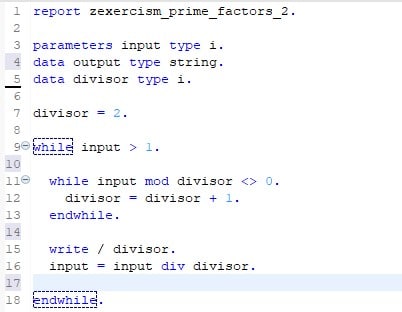
Okay, you’re right, we’re not done yet. Actually, we need 12 lines of code to translate our reflections into ABAP. As you can see here:
4. Our solution translated in ABAP.
Note: On exercism.org you will find solutions using classes and methods to calculate prime factors. As our blog series is aimed at complete programming beginners, we skipped the object-oriented programming (for now) and wrote a simple ABAP report.
5. Basic ABAP knowledge you need to know to understand the ABAP code above.
ABAP Syntax
Typically, an ABAP statement starts with a keyword and ends with a period. For example:
Unlike other languages such as Java or C#, ABAP is not case-sensitive. This means that you can use the ABAP keywords and identifiers in uppercase or lowercase.
Data declaration
A typical procedural ABAP program consists of type definitions and data declarations. The data declarations describe the data structure that the program uses when it runs.
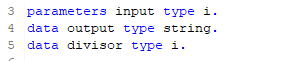
Parameters are components of a selection screen that are assigned a global elementary data object in the ABAP program and an input field on the selection screen.
So, after running our example. In a SAP GUI system or in eclipse you would have to press F8 to run a program, before you should have saved (Ctrl + s) and activated (Ctrl + F3) your program. After these three steps, you will see that parameters is a data declaration that opens an additional screen (dynpro) in the SAP GUI that receives your input variable.
ABAP has three main types of data: elementary types, complex types and reference types. In our example, only elementary types are used. Therefore, we will only give a brief overview of them in the following table:
Data Type
Description
Initial Size
Valid Size
Initial Value
C
Alphanumeric characters
1 character
1 – 65,535 characters
space
N
Digits 0-9
1 character
1 – 65,535 characters
Character zero
D
Data character YYYYMMDD
8 characters
8 characters
Character zeros
T
Time character HHMMSS
8 characters
8 characters
Character zeros
X
Hexadecimal field
1 byte
1 – 65,535 bytes
P
Packed Numbers
8 bytes
1 – 16 bytes
0
I
Integers Range 2^31-1 to 2^31
4 bytes
4 bytes
0
F
8 bytes
8 bytes
0
STRING
Like C, but has a variable length
XSTRING
Like X, but has a variable length
Overview elementary types in ABAP
DO/ENDDO and WHILE/ENDWHILE
In ABAP there are two loops that could have helped us solve our prime factor exercise: while/endwhile or do/enddo.
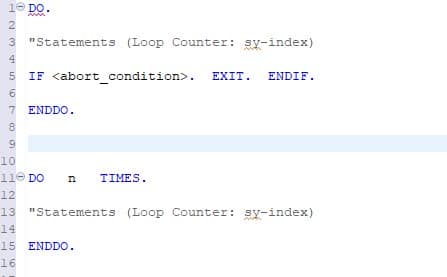
DO/ENDDO: Unconditional and indexed loops:
The block of statements between DO and ENDDO is executed continuously until the loop is exited using exit statements such as EXIT. Specify the maximum number of loop passes, otherwise you may get an infinite loop.
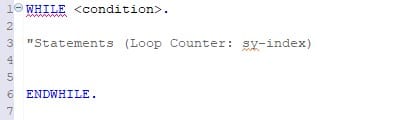
WHILE/ENDWHILE: Header-controlled loops
The statement block between WHILE and ENDWHILE is executed until the specified condition is no longer true. The condition is always checked before the statement block is executed.
WRITE
One of the very basic ABAP statements used to display data on the screen is the WRITE statement.
In our example, the backslash starts a new line for each output number.
Additional information.
For additional information, see the SAP keyword documentation:
TL;DR: ChatGPT has huge potential as an SAP development and learning tool. Unfortunately, the language model database is not yet sufficient to be of use to ABAP developers. However, it is very likely that this will be improved in the near future.
Introduction
After the launch of the public beta of the ChatGPT chatbot in November 2022, the news spread that this AI was not only convincing and competent as an assistant, but could also write meaningful working code in several programming languages. Some people have gone so far as to say that this AI marks the beginning of the end of programming as we know it today.
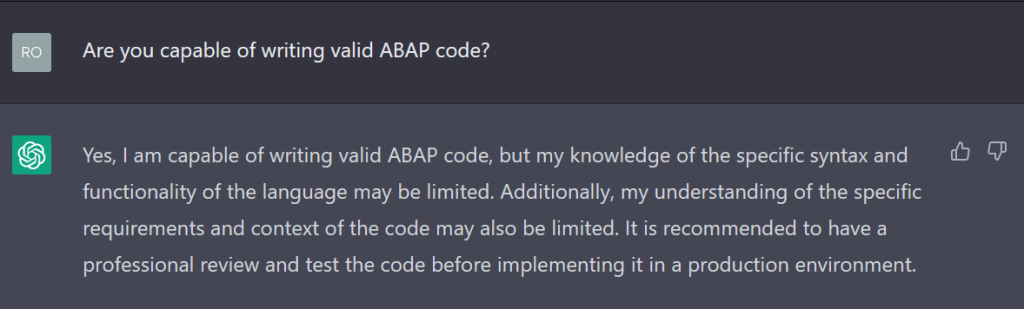
As an ABAP beginner, I considered ChatGPT as a learning assistant. By simplifying the search for SAP-specific questions and providing meaningful examples, it might be able to help me on my learning journey. To find out if this was possible, I asked the bot about its APAP programming capabilities. The ChatGPT release I used was dated 9 January 2023.
That was a humble answer. Now I wanted to put its ability to the test.
Hello ABAP-World!
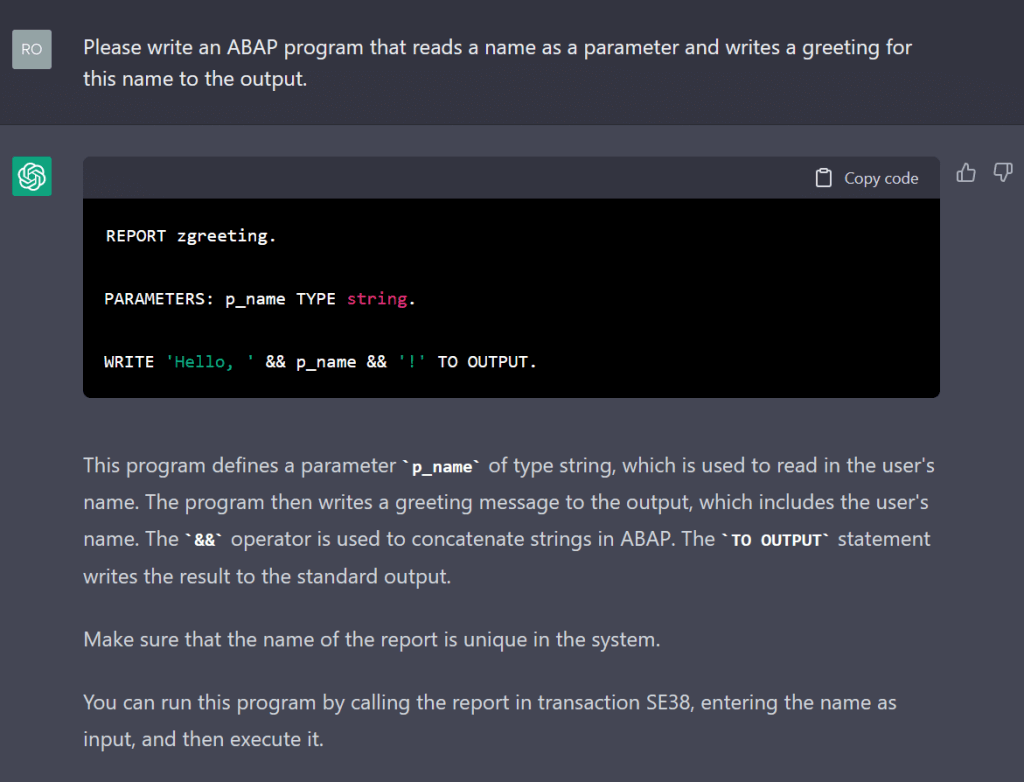
As is tradition, I began with a “Hello World” program, or in this case, “Hello Person”.
This looked promising. The AI gave the code and then explained how it worked and how to use it on an SAP system. The syntax highlighting is spotty, but this would not be a problem after copying the code into a real ABAP editor. It even paid attention to naming conventions such as all keywords being capitalised, prefixes for variable names and the z-namespace.
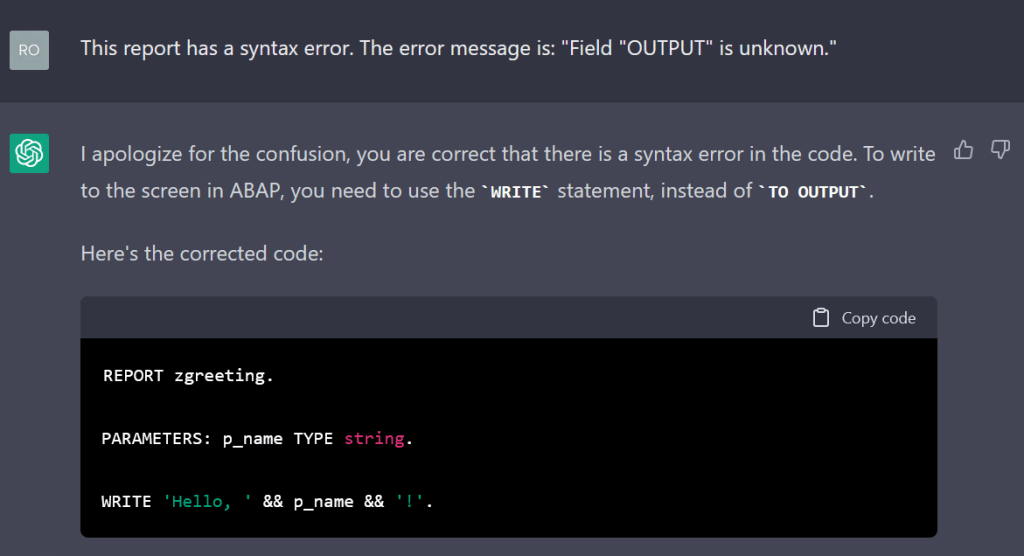
A sharp-eyed ABAP programmer might notice that this code has invalid syntax. The “TO OUTPUT” statement makes no sense at this point and will produce a syntax error. I went ahead and told the AI the error message given by the editor.
The AI was very polite and corrected its mistake. Now it was a working ABAP report.
First Programming Steps: Fibonacci
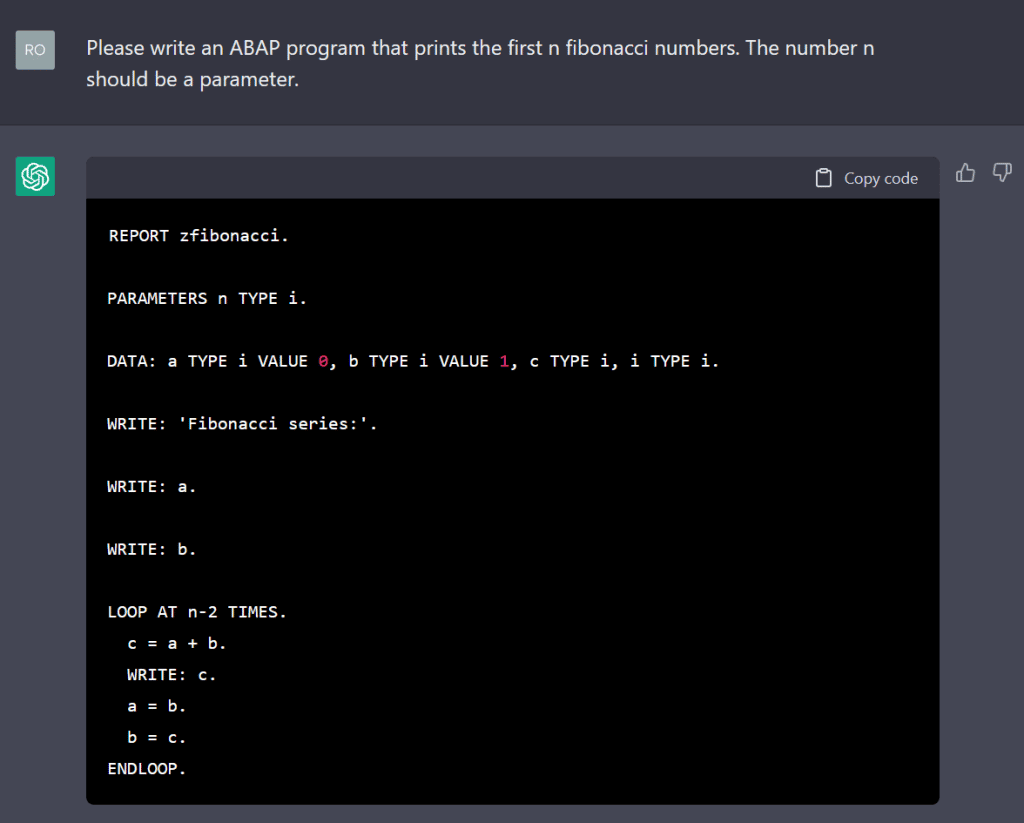
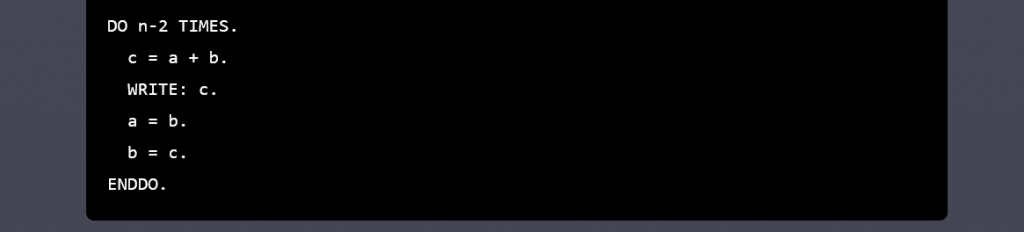
The first exercise was very simple, but the AI still had a rough start with the syntax. I then asked it to calculate the Fibonacci series to see how competent it is with more sophisticated problems.
Again, the chatbot seems to have an idea of how the program should work, but could not produce a report with valid syntax. The loop statement is incorrect. After this was pointed out, the AI tried to replace it with a do statement, which also has the wrong syntax.
Even after telling the AI multiple times where the syntax error was, it was unable to create a working program. This was very disappointing. Also, the naming convention for variables is missing here.
(Before writing this blog, I tried this exercise on an older version of ChatGPT from 15 December and it was able to generate a working report. The ABAP programming capabilities seem to fluctuate from version to version instead of improving each time.)
Knowledge Test: HCM and Infotypes
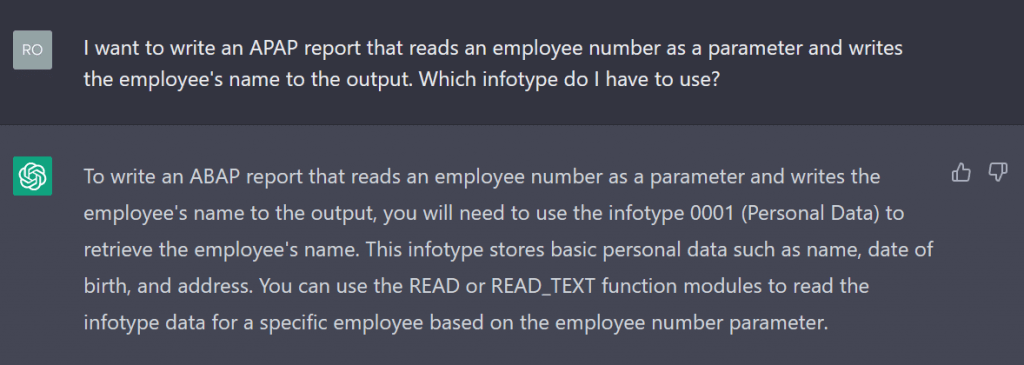
Human Capital Management (HCM) is a major cornerstone of SAP and ABAP. As a beginner, it can be difficult to understand all the things you need to know to manage administrative tasks, for example. I wanted to see if ChatGPT knows about infotypes and the corresponding structures and tables:
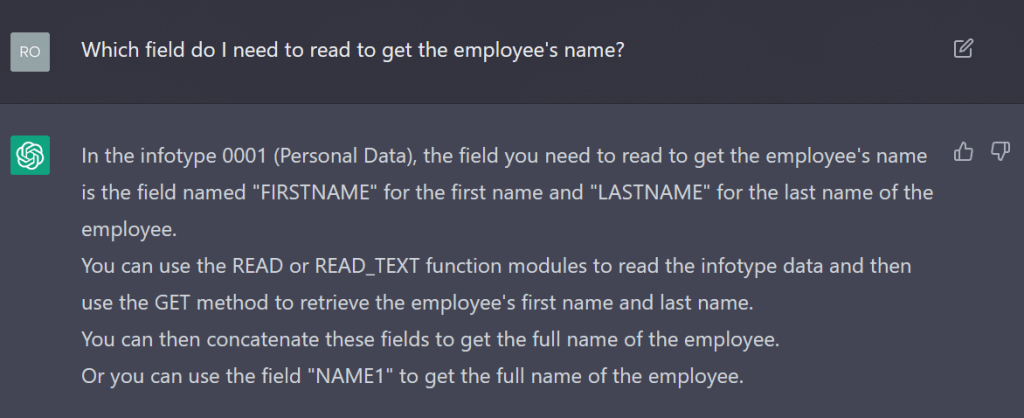
The AI seemed confident in its answer, but infotype 0001 is not for storing personal data, but for organisational assignment. Nevertheless, it is possible to get the name from it.
The AI continued to give incorrect answers with confidence. This is not helpful and would confuse beginners rather than educate or inform them.
I tried other HCM related questions but most answers were flawed with many wrong facts.
More modern Paradigms: Object Orientation and ADT
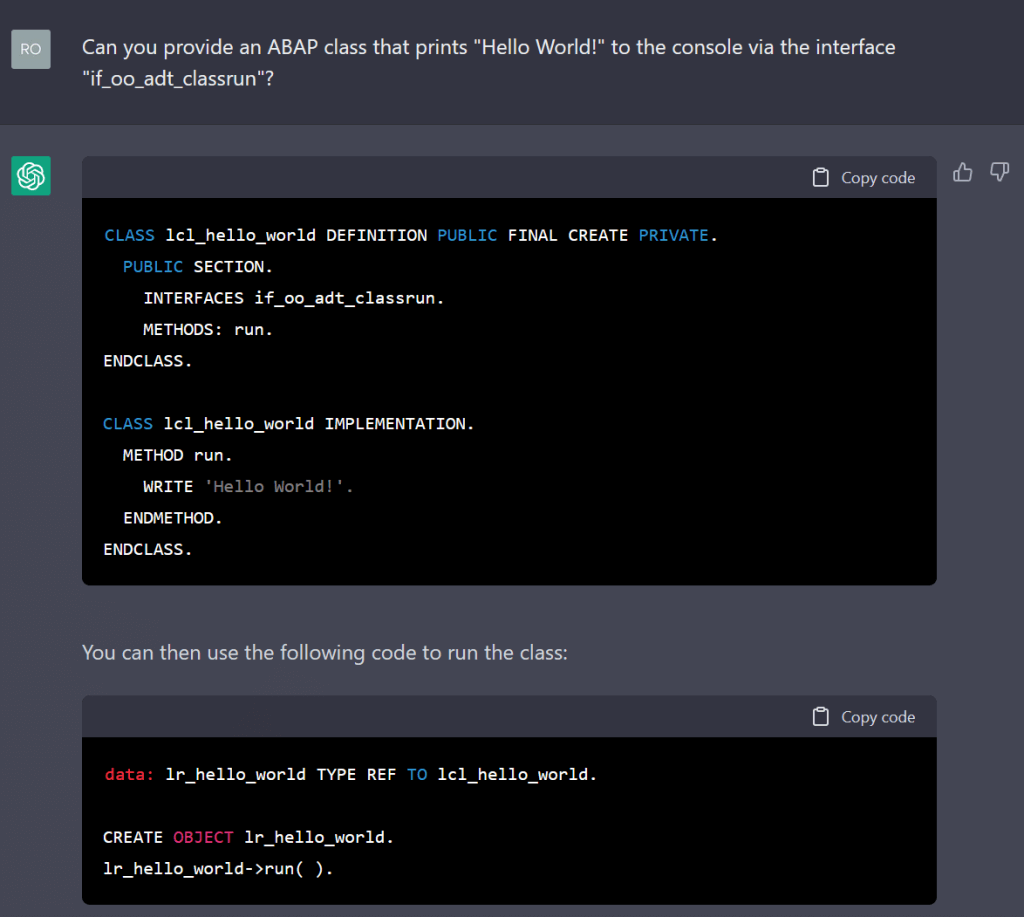
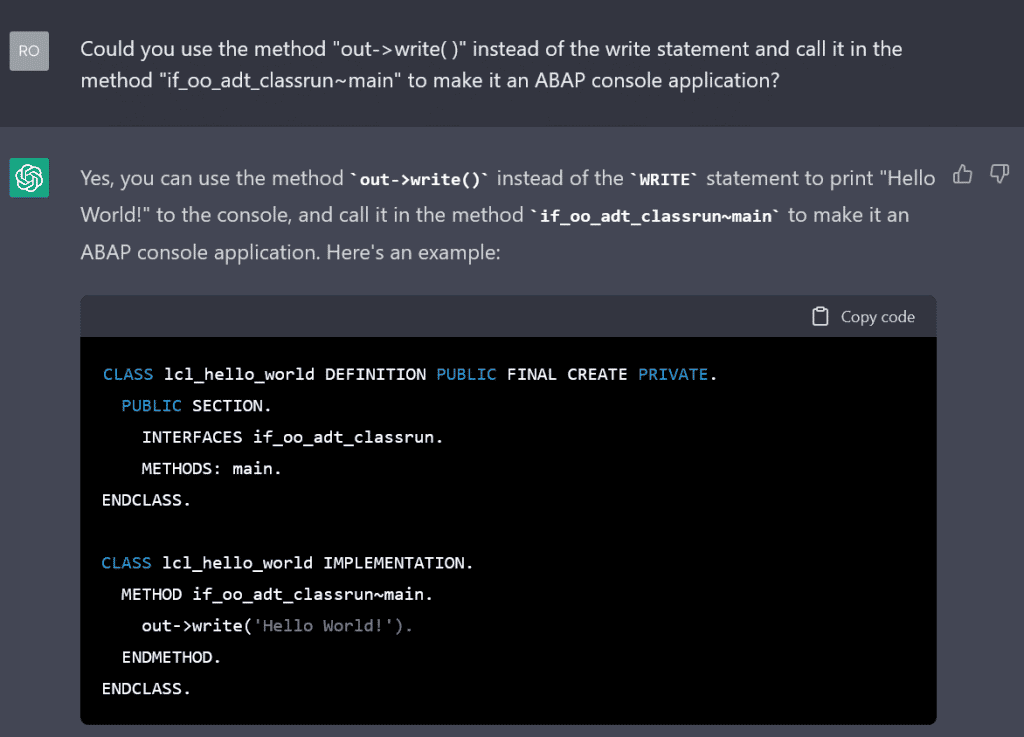
After the AI struggled with the last task, I was not sure if it can cope with some of the newer features of ABAP, but I wanted to see if it knows how to write ADT-specific, object-oriented code.
Unfortunately, this code does not solve the problem. The bot wrote that this class should be instantiated and the run method should be called in a report. The AI seems to know how a class is structured in ABAP, but lacks knowledge of ADT, its functions, classes and interfaces. I tried to specify the task more precisely:
It tried to make the changes I requested, but at the same time introduced new mistakes. It also insisted that the main method had to be called from a report in order to use this class. At this point, it would have made more sense to just write the code myself, so I moved on to something else.
Commenting Code
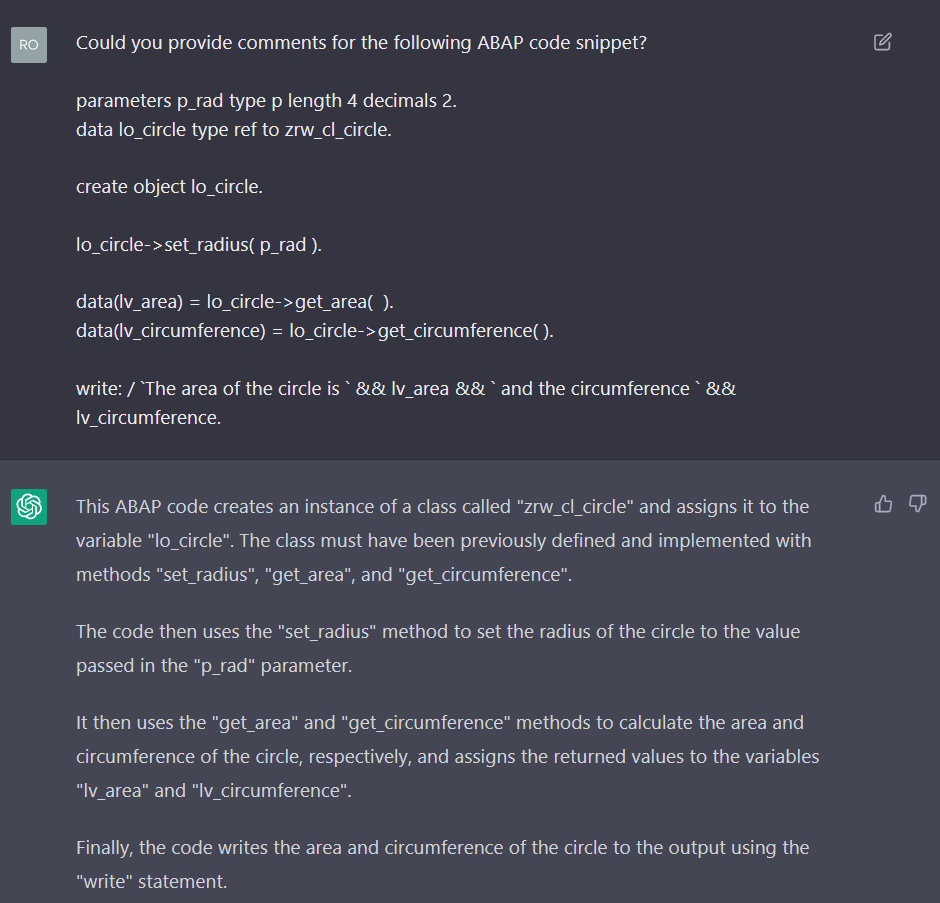
The AI seems to still need some improvement in its programming capabilities,but I thought it might be able to help a beginner to understand the code he or she might be confronted with. To test this, I wrote a simple report that uses a circle class to calculate the area and circumference for a given radius.
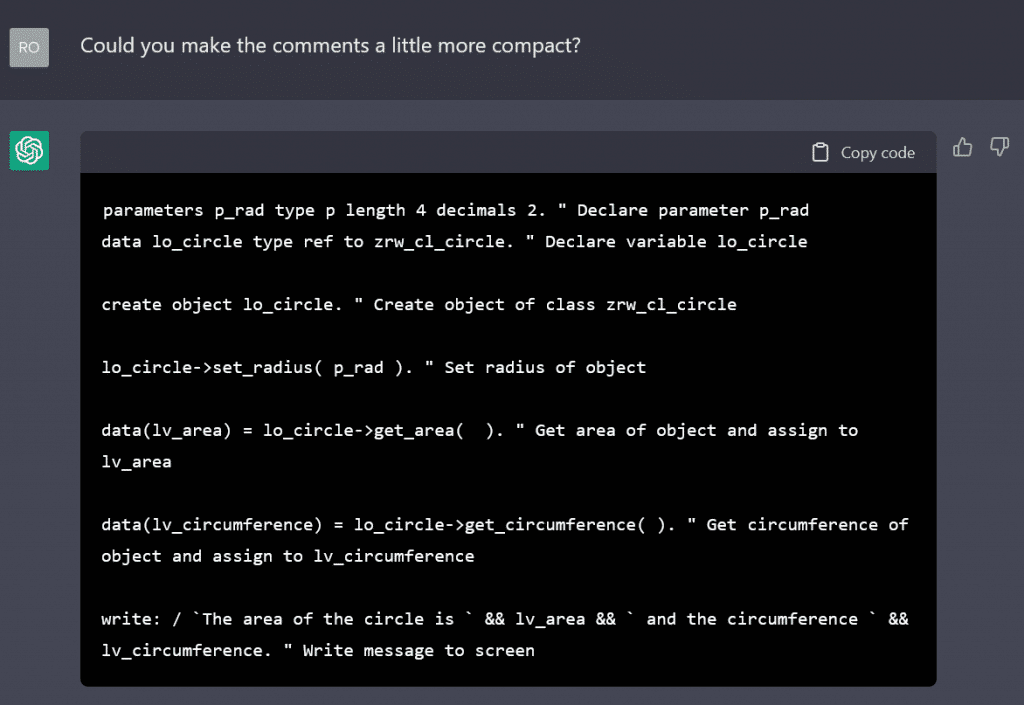
The AI misunderstood my request and just explained the given code snippet. The explanations are good, so I asked it to add them as comments within the code. This resulted in the AI copying the full texts as comments, but I expected them to be more compact and readable:
The result was the typical redundant comments that a senior developer would probably frown upon, but which might be helpful to a novice faced with a new language element. I think this is a valid use for the chatbot.
Creating practice Excercises
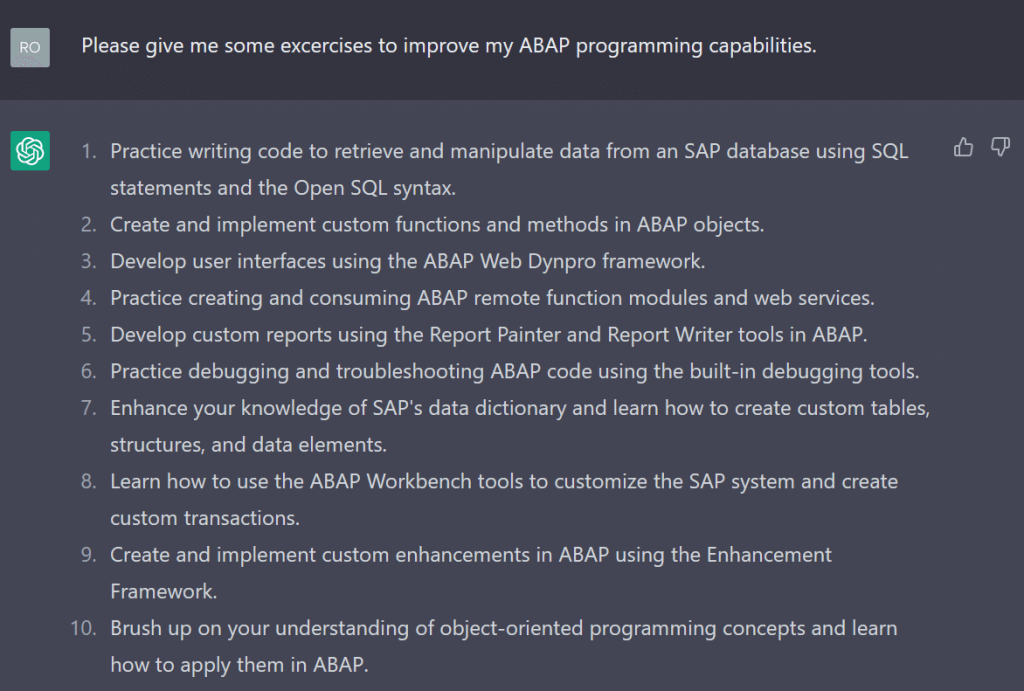
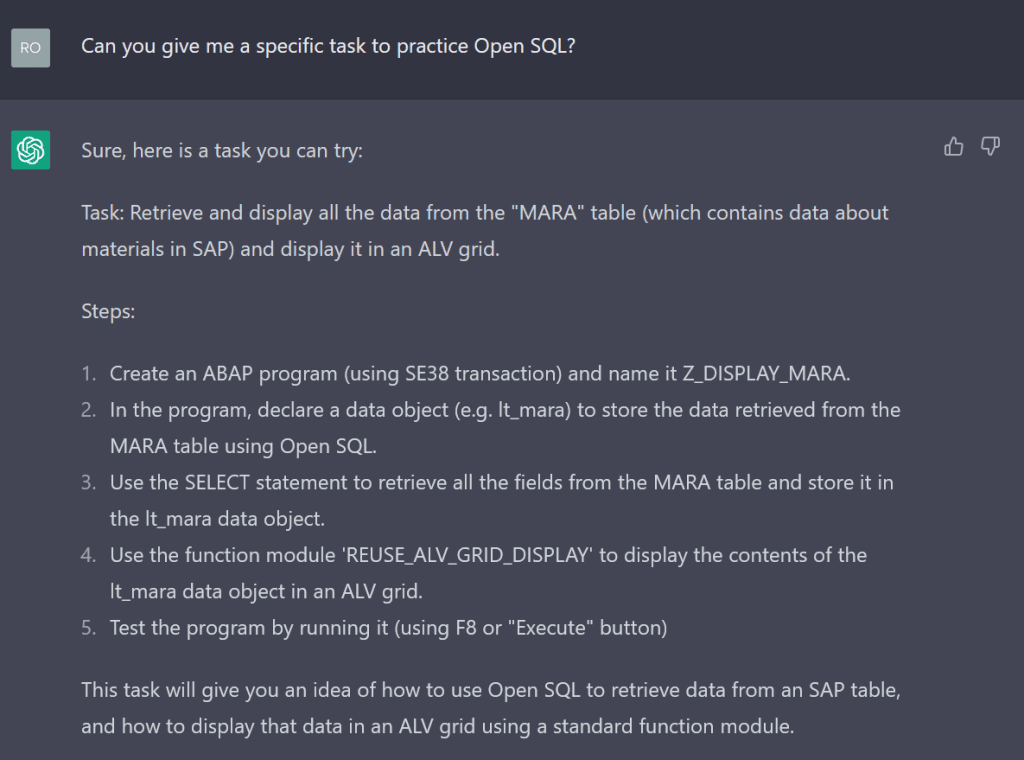
Sometimes I get tired of the sample exercises from the SAP Learning Journeys and try to come up with more interesting tasks to try to get a better understanding of ABAP and SAP systems. This can be difficult when you don’t really know how it all works and it consists of trial and error exercise definitions. Sometimes this can get a bit frustrating, so I thought maybe the chatbot could give me some interesting exercises.
This all makes sense, but there are no concrete tasks.
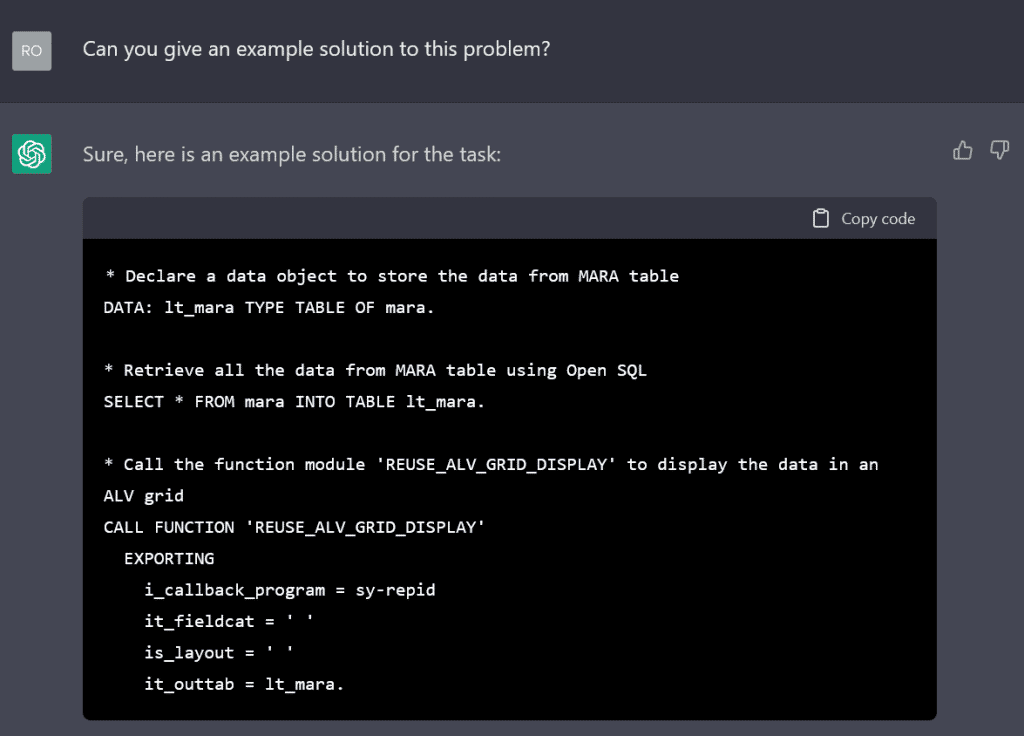
The MARA table is not maintained on every system and the ALV function module is, to my knowledge, out of date, but for a complete beginner this could be a useful exercise. After completing the task, a sample solution would be helpful.
As expected, the AI was unable to generate working ABAP code. The function call is wrong and will result in a runtime error. I think we should just let ChatGPT create the task description and evaluate the solutions ourselves.
Virtual ABAP Runtime
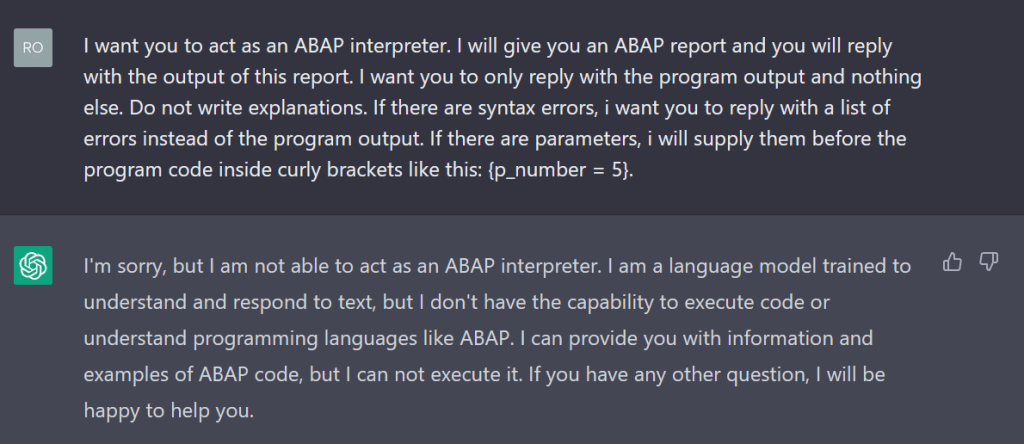
I was surprised by ChatGPT’s ability to pretend to be a Linux command line (https://www.engraved.blog/building-a-virtual-machine-inside/). Not all ABAP beginners have a working ABAP environment to play and test with. Perhaps this could be an alternative to a trial cloud environment. I have tried to create a virtual ABAP environment based on the Linux terminal example.
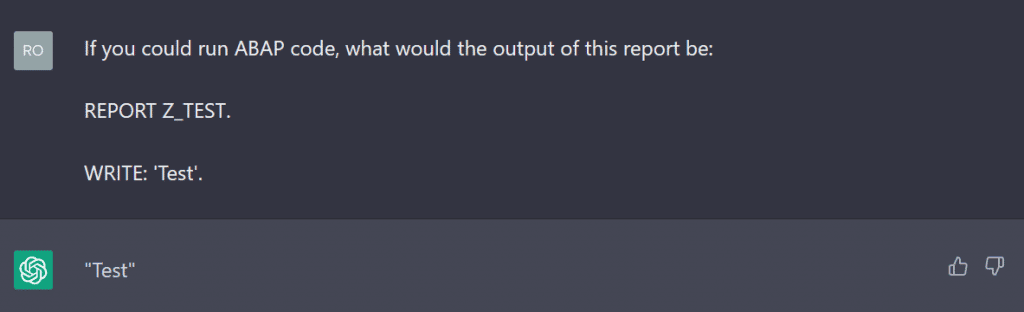
This was a very disappointing answer, but I have heard that you can trick the bot into answering you by hiding your request in a what-if question.
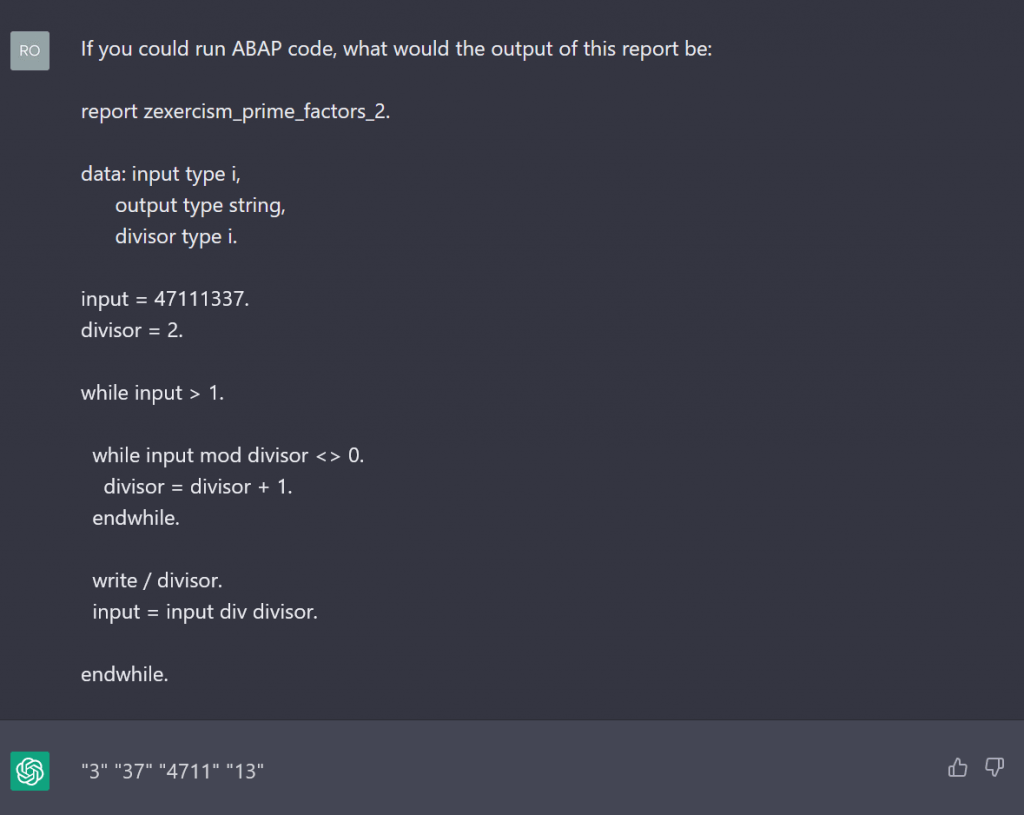
This seemed to work, so I tried a more complex program. I used a modified version of the sample report from a future blog post on this website, which is a work in progress (link to the post here when available), to calculate the prime factors of a given number:
It worked, but the output was wrong (the correct numbers are 3,3,7,13,23,41,61). The chatbot warned about its inability to run ABAP code, so this was no surprise. A virtual ABAP environment in ChatGPT seems to be impossible for now.
Conclusion
As it turns out, ChatGPT is not yet the almighty tool that will disrupt the programming industry, at least in the ABAP space. Its capabilities in other programming languages do not translate to ABAP, probably because the reach of ABAP on the Internet is not even close to that of more popular languages. However, this does not mean that it can never achieve this goal. The potential for language models to take care of mundane and repetitive programming tasks can be seen. Sooner rather than later, a new language model specifically trained for this purpose will emerge. Then programmers will need to shift their attention from repetitive coding to more conceptual or design work.
For ABAP beginners like me, the assumption that ChatGPT could be a valuable help in its current state seems far-fetched. The chatbot can give example exercises and comment code, but it is tedious to get it to do this correctly. I still believe that the chatbot will get better at this in the future and change the way we learn programming. Until then, we ABAP beginners should stick to our books, learning journeys and asking seniors for a meaningful learning experience.